

Email conversion rate is the percentage of email recipients who take a desired action, like making a purchase, signing up for a service, or clicking a link. It’s calculated using this formula:
(Number of conversions ÷ Number of delivered emails) × 100
For example, if you send 5,000 emails, 150 bounce, and 145 recipients take action, your conversion rate is 2.99%.
Why It Matters:
- It measures the success of email campaigns in driving real results, like revenue or engagement.
- Benchmarks vary: Most industries see 2%–5%, while abandoned cart emails can recover 10%–15% of lost sales.
- Factors like subject lines, CTAs, and email design directly impact conversion rates.
Key Tips to Improve:
- Use personalized CTAs (202% better performance than generic ones).
- Optimize for mobile (46% of emails are opened on mobile).
- Conduct A/B testing to refine subject lines, CTAs, and design.
- Track metrics like click-to-open rate (CTOR) and revenue per email for deeper insights.
Email conversion rate is critical for understanding how well your campaigns drive action and contribute to business outcomes. Focus on improving engagement, personalization, and tracking for better results.
How to Calculate Email Conversion Rate
The Email Conversion Rate Formula
Let’s break down how to calculate your email conversion rate.
The formula is simple: (Number of Conversions ÷ Number of Delivered Emails) × 100. But each part of this equation needs to be measured correctly.
- Number of Conversions: This is the total number of recipients who took the action you wanted – whether that’s buying a product, signing up for a webinar, or downloading a resource.
- Number of Delivered Emails: This is the total emails sent minus the ones that bounced. Bounced emails never make it to the inbox, so including them would skew your results.
"Exclude bounced emails to avoid inflated results." – monday.com
Once you’ve got these numbers, multiply by 100 to turn the result into a percentage.
Example Calculation
Let’s say your company sent out 5,000 emails. Of those, 150 bounced because of invalid addresses or full inboxes, leaving 4,850 delivered emails. Out of the delivered emails, 145 recipients completed a purchase.
Here’s how the math works:
145 ÷ 4,850 = 0.0299. Multiply that by 100, and your conversion rate is 2.99%. This falls within the typical range of 2%–5% for most industries.
To ensure accurate tracking, use UTM parameters in your email links and add conversion pixels to your "thank you" or confirmation pages. This setup helps you clearly measure how well your campaign is performing.
What Affects Email Conversion Rate
Subject Lines and Open Rates
Think of your subject line as the gatekeeper of your email. If it doesn’t grab attention, your email won’t even get opened – let alone convert. The stats are clear: 47% of email subscribers decide whether to open an email based solely on the subject line, while 69% mark emails as spam for the same reason. That’s a lot riding on just a few words.
"Your email subject line is the very first – and possibly last – impression you’re leaving on your reader." – Campaign Monitor
Personalization makes a big difference. Subject lines that feel tailored to the recipient perform 26% better than generic ones. Keep them short – ideally between 30 to 50 characters – to ensure they display properly on mobile screens. Action words like "Shop", "Get", or "Download" can nudge readers toward clicking, and if you’re adding emojis, limit yourself to one per subject line to avoid triggering spam filters.
Don’t overlook the preheader text, either. This snippet, visible in the inbox, acts as a second subject line and can add urgency or context that encourages opens.
Once you’ve nailed the subject line and the email is opened, the focus shifts to your call-to-action.
Call-to-Action Quality
A strong subject line gets the email opened, but a weak call-to-action (CTA) will stop conversions in their tracks. Your CTA is where the magic happens – it’s what drives readers to take the next step.
Personalization works wonders here too. Personalized CTAs perform 202% better than generic ones. Instead of vague phrases like "Learn More", go for something direct and benefit-driven, like "Get $50 Off Now!" or "Start Your Free Trial". Keep it short and snappy – five words or less is ideal.
"A sales email is only successful if your lead follows through with what you asked them to do in your call to action." – Stefan Smulders, Founder, Expandi
Design plays a crucial role as well. Make your CTA button stand out by using bold, contrasting colors. On mobile, ensure buttons are at least 44×44 pixels so they’re easy to tap. And stick to one primary CTA per email – too many options can overwhelm readers and hurt conversions.
With a clear and compelling CTA, the next step is ensuring your email design and content deliver on the promises made.
Email Design and Content
Your email’s content has to match the expectations set by the subject line. If there’s a disconnect, you might see high open rates but low conversions – a frustrating outcome for any campaign.
Design is especially important, given that 46% of emails are opened on mobile devices. To ensure a smooth experience, use a single-column layout, make text sizes readable, and design buttons that are easy to tap without zooming.
Personalization should go beyond just including someone’s name. Segmented campaigns – those tailored to specific audience groups – can increase click-through rates by 50%. For example, in 2025, Ixigo teamed up with CleverTap to create behavioral triggers based on user actions like app uninstalls or abandoned bookings. By testing personalized templates and mapping user journeys, they achieved a 30% jump in conversion rates.
Adding social proof is another effective tactic. Bite’s email campaigns used media reviews and customer testimonials to address hesitation and build trust. Including elements like star ratings or testimonials directly in your email can reassure readers and encourage action.
Finally, consistency is key. If your email promotes a 20% discount, make sure that offer is front and center on the landing page when someone clicks through. A seamless experience between email and landing page can make all the difference.
The Step-by-Step Email Copy Guide & Proven Conversion Framework
sbb-itb-112c64b
Email Conversion Rate Benchmarks
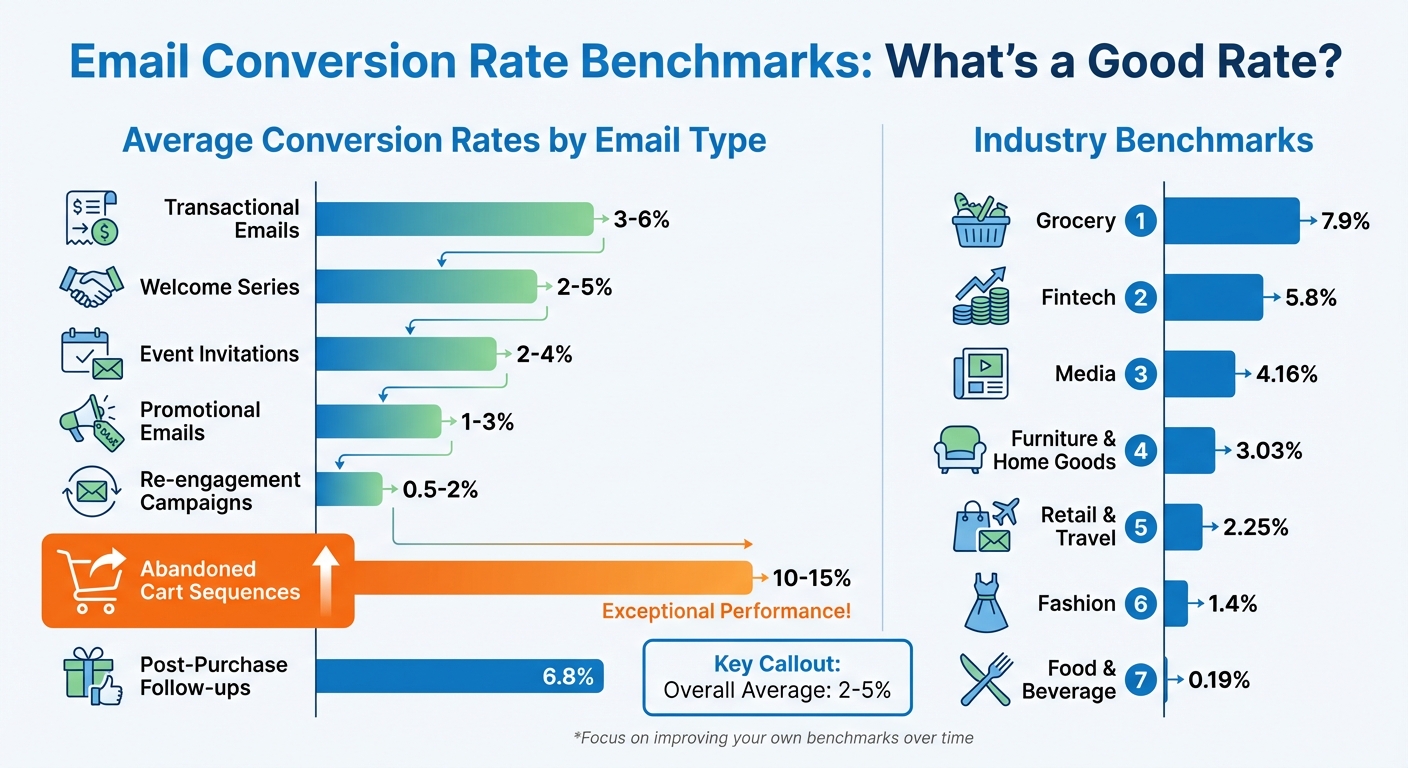
Email Conversion Rate Benchmarks by Industry and Email Type
Average Rates by Email Type
Understanding email conversion benchmarks is key to evaluating your campaign’s performance. Conversion rates often fall between 2% and 5%, depending on the email type.
Transactional emails lead the pack, converting at 3% to 6%. These emails, like order confirmations, perform well because they’re triggered by user actions. Welcome series emails follow closely with a 2% to 5% conversion rate, benefiting from the excitement of new subscribers. Event invitations see conversion rates of 2% to 4%, helped by their time-sensitive nature.
On the lower end, promotional emails convert at 1% to 3%, as they target broader audiences with general offers. Re-engagement campaigns perform modestly, converting 0.5% to 2%, reflecting waning subscriber interest. However, specialized campaigns like abandoned cart sequences can recover 10% to 15% of lost sales, and post-purchase follow-ups average an impressive 6.8%.
Industry benchmarks provide further insights. Grocery tops the list with a 7.9% conversion rate, followed by Fintech at 5.8%. Media achieves 4.16%, while furniture and home goods convert at 3.03%. Retail and travel hover around 2.25%, fashion drops to 1.4%, and food and beverage lags at just 0.19%.
Why Benchmarks Differ
Conversion benchmarks vary due to industry-specific conditions and audience behavior. Industries with frequent purchases and shorter sales cycles tend to see higher conversion rates, whereas slower cycles or less engaged audiences result in lower figures.
Audience intent plays a big role. For example, welcome emails target eager new subscribers, which explains their higher conversion rates. In contrast, re-engagement emails aim to win back disengaged users, leading to lower results. List quality also matters – permission-based, segmented lists consistently outperform purchased or outdated ones because they target genuinely interested recipients.
"Revenue per email matters more than conversion rate alone – a 2% rate generating $100 per conversion beats 5% generating $10 per conversion." – Chaviva Gordon-Bennett, Content Strategist, monday.com
Seasonality also impacts benchmarks. Retail and e-commerce conversion rates often spike during Black Friday and the holiday season, while B2B rates may dip in the summer or at the end of a quarter. The takeaway? Use industry benchmarks as a guide, but focus on tracking your own performance over time to establish benchmarks tailored to your audience and goals.
Armed with this knowledge, dive into strategies to improve your email conversion rates in the next section.
How to Improve Email Conversion Rate
Boosting your email conversion rate takes a well-rounded approach that combines engaging content, strategic testing, and diligent metric tracking.
Improve Your Email Content
Personalizing emails goes far beyond simply adding a subscriber’s first name. It can include tailored product recommendations based on browsing habits, location-specific promotions, or messaging tailored to the recipient’s role or preferences. For example, a new lead might need introductory content, while loyal customers or high spenders may respond better to exclusive offers. Personalized calls-to-action (CTAs) perform 202% better than generic ones, while subject line personalization can increase open rates by 41.8%. Additionally, segmented email campaigns have been shown to boost revenue by an impressive 760%.
With more than 66% of emails being opened on mobile devices, designing for mobile is no longer optional – it’s essential. Use compressed images for faster loading, keep paragraphs short, and utilize bulleted lists for easy scanning. Ensure your font size is at least 14 points for readability. Once your content is optimized, take it a step further by conducting systematic A/B testing to refine your approach.
Use A/B Testing
A/B testing is a powerful tool for identifying what resonates most with your audience. To get meaningful results, test one variable at a time – whether it’s the subject line, CTA placement, or email design – and start with a clear hypothesis.
A great example of this in action is from 2025, when the Indian travel platform Ixigo partnered with CleverTap to tackle low email engagement. By using A/B testing to tweak content and formats, and by mapping user journeys to eliminate friction points, Ixigo significantly improved its email performance across different customer lifecycle stages.
When conducting A/B tests, divide your list evenly and aim for at least 100 recipients per variation to ensure reliable data. Experiment with factors like subject line length (30–50 characters often work well), button colors, CTA placement, and even send times. While Tuesday mornings are often recommended, your audience might respond better at a different time. Once you identify the winning version, roll it out to the rest of your list.
Track and Analyze Metrics
After optimizing your content and running A/B tests, it’s crucial to monitor key metrics to refine your strategy further.
One important metric is the click-to-open rate (CTOR), which measures how engaging your content is for those who opened the email. A low CTOR might indicate that your body content isn’t compelling enough, even if your open rates are strong. Similarly, a high bounce rate could point to problems with your email list quality. Regularly clean your list by removing inactive or invalid addresses to maintain a good sender reputation and improve deliverability.
To track conversions effectively, add UTM parameters to your links and use conversion pixels on confirmation pages. Pay attention to performance by device type – if mobile conversions are lagging, revisit your design to ensure it’s user-friendly, with proper layouts and easy-to-tap buttons.
"The true test of an email campaign is its ability to turn a reader into a customer. This is where the email conversion rate becomes the most important metric for measuring real impact." – Chaviva Gordon-Bennett, Content Strategist, monday.com
Lastly, measure revenue per email to directly tie your campaigns to business outcomes. This metric helps you understand the monetary value each email generates, providing insight into the overall success of your efforts.
Conclusion
Let’s wrap up with a quick recap on how to turn email engagement into measurable business outcomes.
Your email conversion rate is the ultimate indicator of success in email marketing. Metrics like open rates and click-through rates are useful for gauging engagement, but conversion rates tell you if your campaigns are actually driving results – whether that’s sales, sign-ups, or downloads. Over one-third of marketing leaders rank this as their top performance metric.
Key Takeaways
Improving your email conversion rate has a direct impact on your business growth. With email marketing delivering an average ROI of $36 for every $1 spent, tracking conversions isn’t just helpful – it’s essential for proving ROI and securing your marketing budget. While industry benchmarks suggest a "good" conversion rate is between 2% and 5%, your real focus should be on consistently improving your own results.
Here’s what drives better conversions:
- Personalized CTAs: These perform 202% better than generic ones. Tailoring your calls-to-action to your audience can make a huge difference.
- Mobile Optimization: Nearly half of all emails are opened on mobile devices, so ensuring a seamless mobile experience is critical.
Testing and tracking are your best tools for continuous improvement. Use A/B testing to experiment with subject lines, CTAs, and send times. Pay attention to metrics like click-to-open rates and revenue per email to directly link your campaigns to business outcomes. And remember, a 2% conversion rate on a high-ticket product can often outperform a 5% rate on a low-cost item.
FAQs
What is the best way to improve my email conversion rate?
Email conversion rate is the percentage of recipients who take a specific action – like making a purchase, signing up for a service, or downloading a resource – after opening your email. It’s a crucial metric for measuring how well your emails are driving engagement and helping you meet your growth or revenue targets.
To boost your email conversion rate, start with personalization and segmentation. Craft emails that align with your subscribers’ interests and behaviors. Personalized content often captures attention more effectively. Pair this with a clear, eye-catching call-to-action (CTA) that stands out visually and urges immediate action, like “Download Your Free Guide Now.”
Your emails should also be mobile-friendly. Use concise text, simple layouts, and buttons that are easy to tap on smaller screens. Experiment with elements like subject lines, CTA phrasing, or overall design to discover what resonates best with your audience. Timing matters too – send your emails when your readers are most likely to engage. Adding social proof, such as testimonials or user statistics, can build credibility and encourage action.
Lastly, ensure your landing pages match the promises made in your email. Keep forms short and straightforward to reduce barriers for your audience. For bloggers, tools like Blogger Outline offer templates and strategies to refine your email marketing efforts and track performance effectively.
What are the key factors that influence email conversion rates?
Email conversion rates hinge on several crucial elements. First up, audience segmentation – targeting the right people makes all the difference. Sending emails to a carefully curated, engaged audience works far better than blasting generic messages to a massive, untargeted list. Next, the quality and relevance of your content take center stage. Messages that are clear, to the point, and address your readers’ specific needs and interests are far more likely to spark action. And don’t underestimate the power of a strong call-to-action (CTA). Your CTA should be direct, persuasive, and easy to follow, nudging readers in the direction you want them to go.
There are other factors to keep in mind. Email deliverability is key – your message has to land in the inbox, not the spam folder. Then there’s timing and frequency: sending emails at the right moment and not overwhelming your audience helps keep them engaged. Personal touches, like personalization (using the recipient’s name or tailoring content to their behavior), can make your emails feel more relevant. Plus, ensuring a mobile-friendly design is crucial, as more people check emails on their phones than ever before. Finally, your email content should align seamlessly with the landing page experience. This consistency helps maintain the flow and keeps readers on track to convert.
By honing in on these tactics, bloggers can boost email conversion rates, paving the way for blog growth and monetization. Blogger Outline provides tools and expert advice to help you put these strategies into action.
Why is email conversion rate important for your business?
Email conversion rate matters because it reveals how well your campaigns inspire subscribers to take action – whether that’s buying a product, signing up for a service, or downloading a resource. It’s a direct indicator of how effectively your emails are performing and helps you evaluate your return on investment (ROI).
Tracking this metric allows you to pinpoint what’s working, fine-tune your approach, and strengthen your relationship with your audience. In the end, a strong email conversion rate can significantly impact your revenue and contribute to business growth.