

Want better SEO rankings and higher click-through rates? Start with your URLs.
A clear, concise, and keyword-focused URL helps search engines understand your content and builds trust with users. Here’s what you need to know:
- Keep URLs short: Aim for 50–60 characters. Shorter URLs rank higher and are easier to share.
- Use keywords: Incorporate 1–2 relevant keywords to boost relevance and click-through rates.
- Use hyphens, not underscores: Hyphens improve readability for both users and search engines.
- Stick to lowercase: Avoid uppercase letters to prevent duplicate content issues.
- Remove stop words: Words like "and", "of", or "the" often clutter URLs without adding value.
- Avoid dates and numbers: These can make content feel outdated or inaccurate over time.
- Match your URL to the content: Ensure the URL reflects what the page is about for better user trust.
- Limit parameters: Dynamic URLs with too many parameters can confuse search engines.
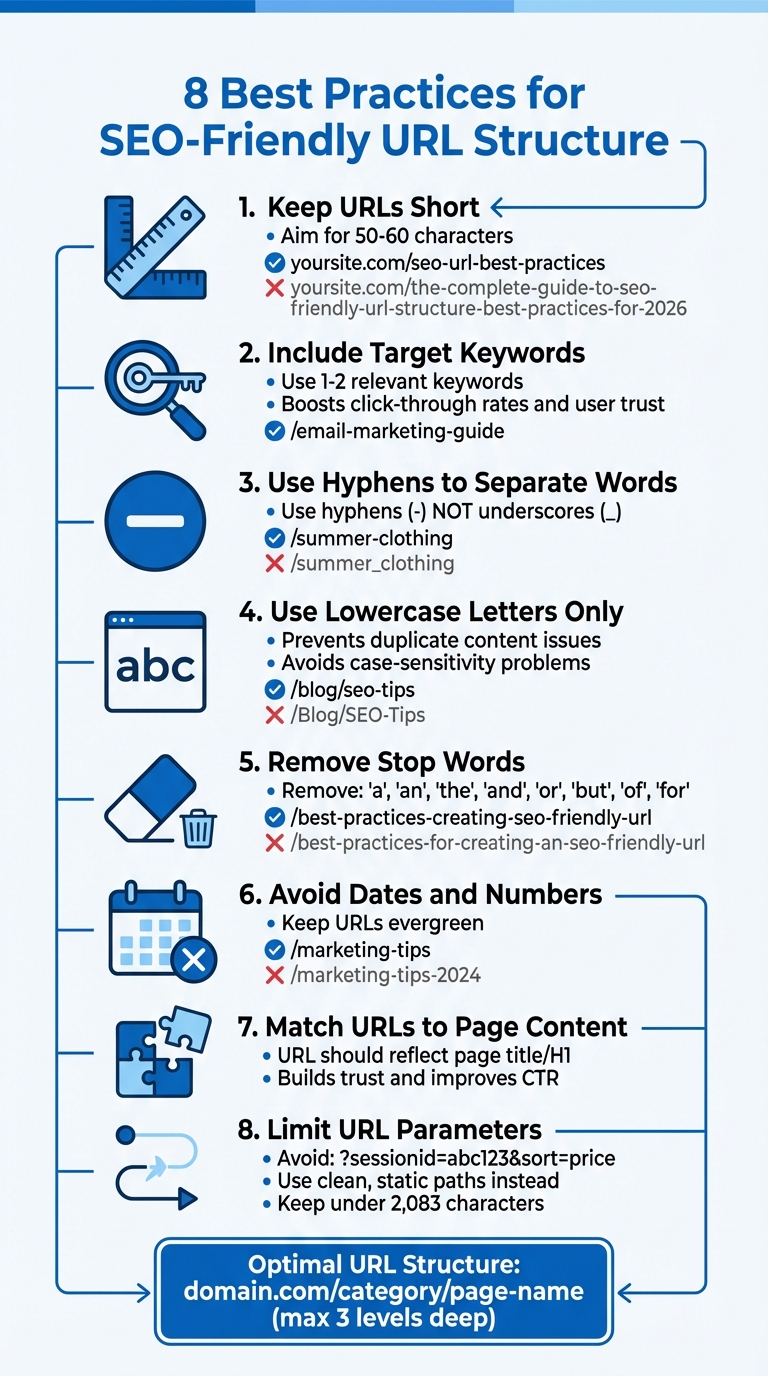
8 Best Practices for SEO-Friendly URL Structure
URL Structure: Best Practices to Boost SEO
1. Keep URLs Short
When it comes to URL optimization, shorter is better. A clean, concise URL not only helps users quickly understand your page’s purpose but also makes it easier for search engines to process. Instead of something unwieldy like yoursite.com/the-complete-guide-to-seo-friendly-url-structure-best-practices-for-2026, aim for something streamlined, such as yoursite.com/seo-url-best-practices. This approach ensures clarity and usability.
The ideal URL length falls between 50 and 60 characters. This range prevents your URL from being cut off in search results, which typically happens when it exceeds 80 characters. Neil Patel, Co-Founder of NP Digital, emphasizes this point:
The ideal max length of a URL should be between 50 and 60 characters. If you go much further (say, 80+ characters), your URL will be cut off, and online users can’t see it properly
Shorter URLs often perform better in rankings. A 2023 study highlighted that concise URLs tend to rank higher than longer ones. While Google can technically handle URLs up to 2,083 characters, the real benefits of shorter URLs lie in their usability and shareability. They’re easier to copy, paste into emails, share on social media, and even type directly into a browser.
To stay within the 50–60 character range, focus on three to five core words in your URL slug. Drop unnecessary words like "a", "the", "and", or "of". For instance, instead of /the-best-tips-for-email-marketing, simplify it to /email-marketing-tips. This keeps your URL lean, clear, and optimized around your main keywords.
2. Include Your Target Keywords
In addition to keeping URLs concise, incorporating target keywords can enhance both user trust and search relevance. By adding your primary keyword to the URL, you signal the page’s topic to search engines. While John Mueller, Senior Search Analyst at Google, has stated that keywords in URLs are a "very, very lightweight ranking factor", they still hold value for both SEO and user experience.
The real strength of keyword-rich URLs lies in their ability to boost click-through rates (CTR) and build user trust. A 2023 study by Backlinko revealed that webpages with URLs containing keywords similar to search queries saw better CTRs than those with unrelated URLs. When users come across your link – whether on social media, in an email, or in search results – the keywords in the URL immediately communicate what they can expect to find. As Rand Fishkin, Founder of Moz, puts it:
"Keywords in the URL help indicate to those who see your URL on social media, in an email, or as they hover on a link to click that they’re getting what they want and expect."
This approach not only improves CTR but also ensures the URL remains clear and relevant.
To create keyword-friendly URLs, start with your page title, remove unnecessary words, and focus on one or two core keywords. For instance, transform "The Complete Guide to Email Marketing" into /email-marketing-guide. Keep your URLs streamlined by avoiding generic or filler words. Overloading URLs with more than two keywords can lead to keyword stuffing, which may make your site appear spammy.
Another advantage? When a URL is shared without any custom text, the keywords within it serve as descriptive anchor text. This means search engines can better understand the context of the link, reinforcing its relevance.
3. Use Hyphens to Separate Words
Once you’ve crafted concise, keyword-focused URLs, it’s essential to format them correctly for clarity. Hyphens are the go-to choice for separating words in URLs – and for good reason. Google has consistently emphasized this practice. Search engines interpret hyphens as spaces, so a URL like /summer-clothing is understood as "summer" and "clothing", two distinct words.
On the other hand, underscores can cause issues. Unlike hyphens, underscores connect words, leading search engines to treat them as a single term. Google Search Central advises: "Specifically, we recommend using hyphens (-) instead of underscores (_) to separate words in your URLs, as it helps users and search engines better identify concepts in the URL".
Using spaces in URLs is an even bigger mistake. Spaces are converted to %20, making the URL look messy and less reliable. As John Mueller, Google’s Search Advocate, explains: "I generally recommend avoiding special characters like commas, semicolons, colons, spaces, quotes etc. in URLs, to help keep things simple. URLs like that are often harder to automatically link… and hard for us to recognize correctly".
Hyphens make URLs easier to read and understand for both users and search engines. For instance, a URL like /green-dress is immediately clear, while /greendress or /green_dress forces the reader to pause and figure it out. This simplicity can also build trust and improve click-through rates, especially when URLs are shared on social media or in emails.
To maintain clarity, always use lowercase letters and stick to hyphens for word separation. Avoid unnecessary characters like commas, colons, or semicolons. This approach not only improves readability but also aligns with best practices for creating concise and descriptive URLs.
4. Use Lowercase Letters Only
Using lowercase letters in your URLs isn’t just about aesthetics – it’s a smart technical move. While domain names like example.com aren’t case-sensitive, everything after the domain can be. For instance, /Blog and /blog might be treated as two entirely different pages depending on your server setup.
Linux and UNIX servers are case-sensitive, meaning /AbC and /abc are considered distinct resources. On the other hand, Microsoft/IIS servers are generally case-insensitive. But relying on this behavior can cause headaches if you ever change hosting environments. As Rand Fishkin, Founder of Moz, points out:
If you’re hosting with Linux/UNIX, you can get into trouble as they can interpret separate cases, and thus randswhisky.com/AbC could be a different piece of content from randswhisky.com/aBc. That’s bad biscuits.
This case sensitivity can lead to duplicate content issues. Search engines might index both versions separately, which splits your ranking power. Anna Postol, an SEO and Content Marketing Expert at SE Ranking, emphasizes:
URLs are case sensitive. If you use capital letters, you are creating different addresses, even if the only difference between them is just the uppercase. That’s why we recommend using only lowercase in a website address. Accidentally mixing letters can result in the creation of duplicate pages.
The problem isn’t limited to search engines – it also affects usability. Visitors might type your URL in lowercase and encounter a 404 error if the server expects uppercase. External links with mixed cases can split link equity, and even platforms like Facebook treat URLs as case-sensitive, which fragments engagement metrics.
To avoid these issues, stick to lowercase for all new URLs. If you already have URLs with uppercase letters, set up 301 redirects to their lowercase versions or use canonical tags to signal the preferred URL to search engines. Many content management systems handle this automatically, but it’s worth double-checking your URL structure to ensure everything runs smoothly.
5. Remove Stop Words
Stop words are those common words like "a", "an", "the", "and", "or", "but", "of", and "for" that help with grammar but don’t add much meaning to your URLs. By cutting these out, you can create URLs that are more focused on primary keywords. This makes it easier for both search engines and users to quickly understand what your page is about. For example, words like "the" or "of" usually don’t contribute anything meaningful to a URL’s clarity or SEO value.
Take this example: instead of writing /best-practices-for-creating-an-seo-friendly-url, you could simplify it to /best-practices-creating-seo-friendly-url. This approach keeps the URL concise, strengthens its keywords, and avoids unnecessary truncation.
“If your title/headline includes stop words (and, or, but, of, the, a, etc.), it’s not critical to put them in the URL. You don’t have to leave them out, either, but it can sometimes help to make a URL shorter and more readable.”
- Rand Fishkin, Founder, Moz
That said, readability should always come first. If removing a stop word makes the URL hard to understand or changes its meaning, it’s better to leave it in. For instance, Amanda Sellers from HubSpot highlighted in May 2024 that a URL like /names-of-google-algorithm-updates is clearer and more natural than /google-algorithm-update-names because the stop word "of" helps it flow better for human readers. This aligns with the idea that URLs should balance brevity with user-friendliness.
Keep in mind that most content management systems automatically generate URLs based on your page title, often including stop words. Before hitting publish, take a moment to manually edit the slug. Remove unnecessary articles and verbs like "are" or "have", but ensure the URL still makes sense when read aloud.
6. Create a Logical URL Structure
Your URL structure should reflect the organization of your website. Think of it as a map for both visitors and search engines, guiding them through the relationships between your pages. A clear structure combined with concise, keyword-focused URLs improves navigation and boosts SEO.
To keep things organized, use subdirectories instead of subdomains. For example, example.com/blog/seo-tips is a better choice than blog.example.com/seo-tips because subdirectories benefit from your main domain’s authority. This parent-child setup makes it easier for search engines to understand how your pages and categories connect.
Keep your hierarchy simple – no more than three levels deep. Jacob Kettner, CEO of First Rank, advises this approach to "ensure clarity without unnecessary complexity". For instance, a URL like example.com/marketing/seo-best-practices is much cleaner and easier for search engines to crawl than example.com/blog/2026/january/marketing/seo/best-practices. The fewer slashes in your URL, the better.
Here’s a quick guide to optimal URL structures for different types of websites:
| Website Type | Optimal Structure | Example |
|---|---|---|
| E-commerce | domain.com/category/product-name |
example.com/jackets/red-leather-jacket |
| Blog / News | domain.com/topic/post-title |
example.com/marketing/seo-best-practices |
| Local Business | domain.com/location/service |
example.com/dallas/plumbing-services |
| Service-based | domain.com/service-category/service-name |
example.com/consulting/strategy-development |
Once you’ve set up your URL structure, consistency is key. Ryan Ratkowski emphasizes that changing URLs without proper 301 redirects can lead to broken links and a loss of SEO value. So, plan your structure carefully from the start and stick with it to maintain a strong, seamless foundation for your website.
sbb-itb-112c64b
7. Make URLs Easy to Read
After focusing on structure and keywords, the next step is ensuring your URLs are easy to read. A clear, readable URL gives users a sense of where they’ll land before they even click. For instance, when you see example.com/email-marketing-tips, it’s immediately obvious what the page is about. Compare that to example.com/p=123?cat=9&id=452 – a jumble of characters like this can confuse users and erode trust.
Readable URLs inspire trust and encourage clicks. A 2023 study by Backlinko revealed that pages with descriptive, keyword-focused URLs tend to have higher click-through rates (CTR) compared to those with vague or cryptic URLs. It’s a simple concept: people are more likely to interact with links they understand and feel confident about. As Rand Fishkin, founder of Moz, explains:
"The more readable by human beings, the better… Accessibility has always been a part of SEO."
Stick to clear, concise practices when crafting URLs. For example, instead of using something overly detailed like /how-to-write-the-perfect-seo-friendly-url-in-2024/, opt for a cleaner version such as /seo-friendly-urls/. Shortened URLs are easier to share, copy, and paste – perfect for social media and other platforms.
Also, avoid cluttering your URLs with special characters that can cause issues in browsers or make the link look messy. John Mueller, Senior Search Analyst at Google, advises:
"I generally recommend avoiding special characters like commas, semicolons, colons, spaces, quotes etc. in URLs, to help keep things simple."
8. Avoid Dates and Numbers
Adding dates or numbers to your URLs might seem like a good idea at first, but it can actually shorten the lifespan of your content. For instance, a URL like example.com/best-laptops-2023 instantly feels outdated to someone browsing in 2026 – even if the content itself has been refreshed with the latest information. This issue isn’t just about dates; even numbers in general can create problems when updating content.
Take listicles as an example. If your URL is example.com/10-seo-tips and you later expand the list, the URL becomes inaccurate. Then you’re stuck with two choices: leave the misleading URL as is, or change it and set up a 301 redirect. While redirects can help, they come with risks like broken links or even a drop in search rankings. Maddy Osman, Founder of The Blogsmith, explains:
"In most cases, articles take anywhere from three to six months to appear in the top 10 on SERPs. You don’t want to restrict the potential of that ranking article by including the previous year in the URL slug."
To avoid these pitfalls, stick to evergreen URLs that remain relevant no matter how often you update the content. Instead of /marketing-tips-2024, go with /marketing-tips. Instead of /7-seo-strategies, use /seo-strategies. This way, you can refresh the content as needed without ever touching the URL structure. It keeps your SEO value intact and ensures internal links remain functional. Damian Grabarczyk, Co-founder of PetLab Co., highlights the importance of this approach:
"Optimizing URL slugs with targeted keywords is essential for enhancing Google’s crawling and indexing efficiency. The process starts with a deep dive into search trends to identify keywords that precisely reflect our audience’s search intent."
In short, clean and timeless URLs are key. By using evergreen structures, you protect your SEO efforts and maintain consistency over time.
9. Match URLs to Page Content
Your URL isn’t just a web address – it’s a promise to your audience. When users spot your link in search results, they instantly decide whether to click. If your URL implies one thing but your page delivers something completely different, you risk losing their trust before they even engage with your content.
Think of your URL as a preview of your page. It needs to set clear and accurate expectations. As Rand Fishkin, Founder of Moz, explains:
"The matching accomplishes a mostly human-centric goal, i.e. to imbue an excellent sense of what the web user will find on the page through the URL and then to deliver on that expectation with the headline/title."
Aligning your URL with your page content not only improves user experience but also strengthens SEO. This connection can directly impact your click-through rate (CTR). According to a 2023 Backlinko study, webpages with URLs closely matching search keywords see higher CTRs compared to those with unrelated URLs. When users can easily understand what they’ll find, they’re more likely to click.
To deliver on this promise, your URL should mirror your page title. The solution is simple: make sure your URL reflects your page title or H1 tag exactly. For example, if your article is titled "Email Marketing Tips for Small Businesses", your URL could be /email-marketing-tips-small-businesses. Alternatively, you can shorten it to something like /email-marketing-tips while keeping the main idea intact. Avoid generic or cryptic slugs that leave users guessing about your content.
These practices tie into earlier strategies about keeping URLs short, using keywords, and ensuring readability.
10. Use Descriptive URLs
A descriptive URL does more than just point to a page – it tells users what to expect before they even click. Compare these two examples: example.com?pageId=2b5ebr965f41cbb6f949f740g1 versus example.com/pricing/. The second option immediately gives clarity about the content, which can build trust and encourage clicks.
The idea is to replace technical gibberish – like IP addresses, random numbers, or parameters – with readable text that reflects your content. Think about when someone shares your link on social media or in an email. A URL like /email-marketing-tips-small-businesses gives instant context, while something like /post?id=4729 leaves readers guessing.
While Google treats keywords in URLs as a minor ranking factor, the real advantage lies in user experience. Descriptive URLs make your links more trustworthy and improve click-through rates. They also align perfectly with the broader goal of creating user-friendly, intuitive navigation.
To craft effective URLs, include one or two relevant keywords that summarize your page’s focus. Keep it concise by cutting out unnecessary stop words, ensuring your URL remains clean and easy to read.
11. Limit URL Parameters
Building on the idea of crafting clear and descriptive URLs, managing URL parameters is another step toward optimizing your site for search engines.
URL parameters – those bits of text starting with ? or & – can lead to duplicate content issues and waste your crawl budget. For instance, parameters like ?sessionid=abc123 or ?sort=price&filter=red create multiple versions of the same page. This can confuse search engines, causing them to spend time crawling duplicates instead of focusing on unique content that matters most to your audience.
Duplicate URLs also dilute link equity by spreading backlinks across different versions of the same page. On top of that, overly complex and cluttered URLs can look untrustworthy, which may discourage users from clicking on them.
"If you have more than two URL parameters, it’s probably worth making a serious investment to rewrite them as static, readable, text." – Rand Fishkin, Founder, Moz
To tackle this, convert dynamic parameters into clean, static paths. For example, instead of:
example.com/products?category=shoes&color=red&size=10 opt for something like:
example.com/shoes/red/size-10 This makes your URLs easier to read, both for users and search engines. When parameters are absolutely necessary, you can still manage them effectively. Use canonical tags to signal the preferred version of a page, and exclude parameters like session IDs from being crawled by adding them to your robots.txt file.
Keep your URLs concise – ideally under 2,083 characters. And if you must use parameters, maintain a consistent order, such as listing "color" before "size" every time. This helps search engines crawl your site more efficiently and reduces confusion.
12. Blogger Outline: SEO Resources for Bloggers
Once you’ve implemented these URL best practices, it’s essential to have ongoing support to fine-tune your SEO strategy and adapt to algorithm updates. That’s where Blogger Outline steps in, offering tailored resources and expert advice to help bloggers optimize their URLs and boost search engine performance. With these tools, you can build on the foundational practices mentioned earlier.
The platform not only reinforces essential URL optimization techniques but also provides technical support to elevate your site’s SEO game. For example, Blogger Outline offers guidance on implementing HTTPS and structuring folders logically to improve your site’s crawlability and overall search performance. These are crucial steps to ensure your content is both user-friendly and search-engine-friendly.
"Incorporate relevant keywords in URLs to help search engines understand the content and improve ranking for those terms." – Neil Patel, Co-Founder, NP Digital
Another key focus of Blogger Outline is future-proofing your URL structures. They recommend avoiding dates and numbers in slugs, which makes it easier to update content without dealing with complicated redirects. This forward-thinking approach ensures your URLs remain effective over time.
Whether you’re just starting or looking to refine your SEO strategy, Blogger Outline offers a range of solutions, from free resources to premium consulting services. Their expertise simplifies technical URL optimization and supports high-quality content creation, making it easier for you to achieve broader SEO success.
Conclusion
A well-optimized URL structure can significantly enhance your SEO efforts. Shorter URLs often rank higher on Google, and when they include relevant keywords, they tend to attract better click-through rates.
Beyond rankings, clean and descriptive URLs also improve user experience and trust. For instance, a URL like /seo-best-practices immediately tells users what to expect, unlike a cluttered URL such as /p=123?id=xyz. This clarity not only boosts click-through rates but also makes URLs easier to share across platforms, increasing their reach and visibility.
Taking the time to audit and refine your URL structure can have a lasting impact on your site’s SEO. Start by eliminating unnecessary stop words, avoiding dates to keep content evergreen, and ensuring your hierarchy stays logical and concise – ideally no more than three levels deep. These small but strategic changes can add up over time.
If you’re looking for additional guidance, Blogger Outline offers SEO checklists and templates to help you get started. Their resources are designed to ensure every URL you create is optimized for both search engines and users, setting you up for long-term SEO success.
FAQs
Why is it better to use shorter URLs for SEO?
Short URLs are not only easier for users to read and remember, but they can also boost your click-through rates. When links are straightforward, they’re more likely to grab attention and inspire action. Plus, search engines can better interpret concise URLs, which may improve your rankings in search results.
Another advantage? Shorter URLs are less likely to get cut off when shared on social media or in emails. This ensures your links stay intact and clickable. Keeping your URLs brief and relevant is a small tweak that can make a big difference for your SEO.
Why do keywords in URLs matter for click-through rates?
Including keywords in your URL makes it more descriptive and helps users quickly grasp what the page is about. This added clarity can build trust, making users more likely to click, which can lead to better click-through rates.
On top of that, search engines consider keywords in URLs as a ranking factor. A well-structured URL not only improves the user experience but also boosts SEO performance. To get the most out of your URLs, keep them short, easy to read, and centered on the main topic.
Why should you avoid using uppercase letters in URLs?
Using uppercase letters in URLs might seem harmless, but it can cause a range of problems for both SEO and user experience. Search engines often view URLs with different capitalization as completely separate pages. This can lead to duplicate content issues, which can weaken your backlink profile and lower your site’s authority.
On top of that, uppercase URLs can create confusion for users, make it harder to track errors like 404 pages in analytics, and even waste your site’s crawl budget. To keep things simple and SEO-friendly, it’s best to use lowercase letters in all your URLs.