

Internal links are essential for improving your website’s SEO and user experience. They help search engines find and rank your content while guiding visitors to relevant pages. Here’s the key takeaway:
- New Content: Link to new pages from high-authority existing pages immediately after publishing. Use keyword-rich anchor text and place links early in the content to boost visibility.
- Existing Content: Regularly update older pages with links to newer ones. Focus on high-performing pages to redistribute link equity and improve rankings for underperforming content.
Quick Tips:
- Use contextual links with descriptive anchor text.
- Maintain a clear site structure with no page more than three clicks from the homepage.
- Audit internal links every 4–6 weeks to fix broken links and identify orphaned pages.
Done right, internal linking can improve SEO performance by up to 10%. Start linking smarter today to increase traffic and keep your site organized.
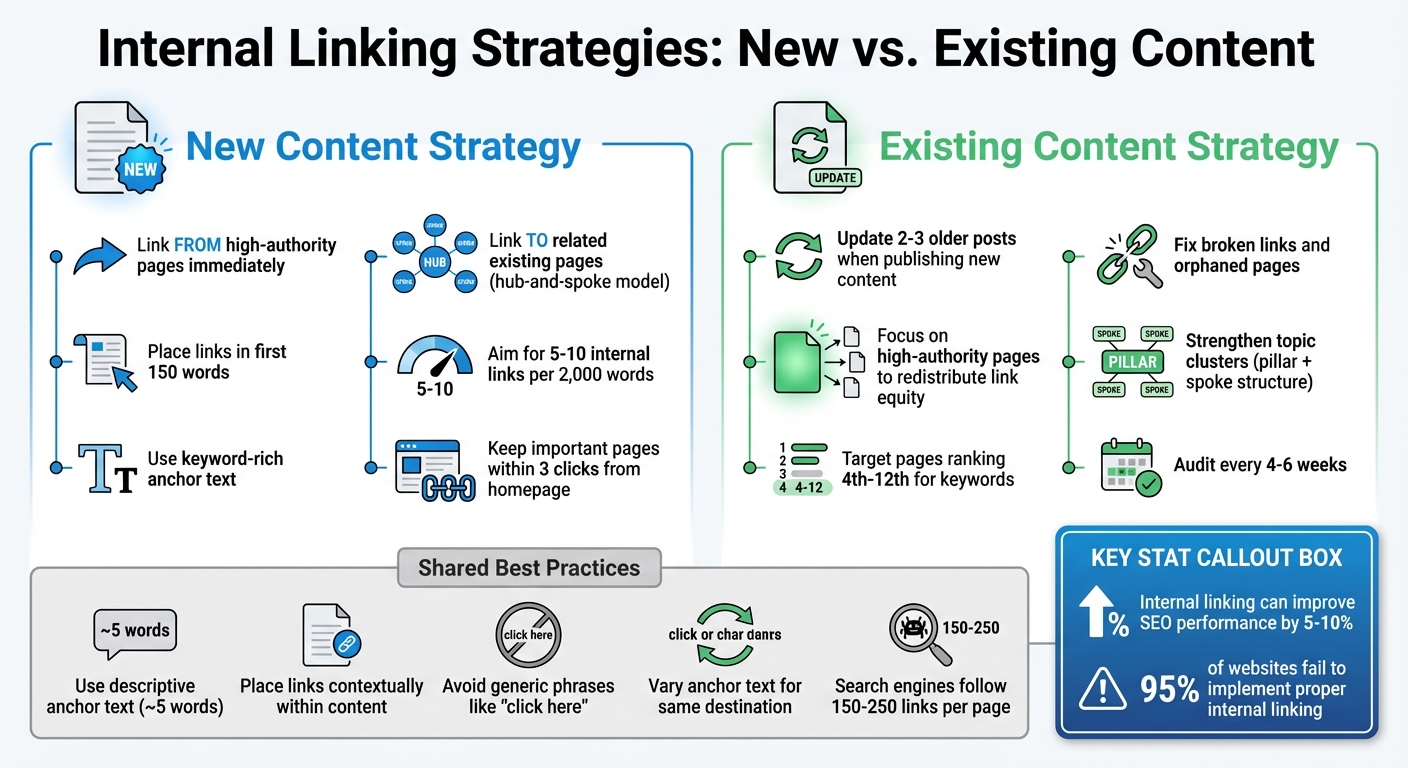
Internal Linking Strategies for New vs Existing Content
Internal Linking Strategy – Boost Your Site With The Right Internal Link Structure
Internal Linking for New Content
When you publish new content, it’s crucial to link it to existing pages right away. Without these connections, your content might struggle to gain visibility in search results. The solution? Create clear, deliberate pathways that link both to and from your new content as soon as it goes live.
Here’s how to ensure your new pages fit seamlessly into your site’s existing structure.
Linking from Existing Pages to New Content
One of the fastest ways to boost your new content’s ranking is by linking to it from high-authority pages on your site. Pages like your homepage, cornerstone articles, or those with strong external backlinks are ideal candidates for this strategy.
A simple way to find relevant pages is by using the Google search operator: site:yourdomain.com "keyword". For example, if your new article is about email marketing automation, search for older posts that discuss email campaigns or marketing tools. Add links to your new content within the first 150 words of those pages – this section often carries extra SEO weight.
Placement is key. Links that appear above the fold or within the first quarter of an article tend to hold more SEO value than those buried near the bottom. Aim to include 5–10 internal links for every 2,000 words of content. Keep in mind that search engines typically follow 150–250 links per page before they might stop crawling additional links.
Linking New Content to Related Existing Pages
Internal linking isn’t just about directing traffic to your new content; it’s also about connecting it back to your older pages. This two-way linking strengthens your site’s internal network, helping search engines better understand the relationships between your pages while boosting topical relevance.
To maximize this strategy, consider using a hub-and-spoke model. Link your new content back to central "pillar" pages that cover broad topics, and ensure those pillar pages link out to more specific "spoke" pages, like your new article. This approach organizes your content into clear clusters and ensures that important pages are no more than three clicks away from your homepage, improving crawlability.
For best results, use contextual links within your content. These links, embedded naturally in your text, provide semantic context through descriptive anchor text. Avoid generic phrases like "click here" and instead use specific, informative terms like "enterprise CRM integration guide." Not only does this improve SEO, but it also enhances the user experience by making navigation more intuitive.
Internal Linking for Existing Content
New pages need immediate integration into your internal linking structure, but don’t overlook the importance of revisiting older content. Regular updates to older pages can help preserve their SEO value and keep them relevant.
Did you know that 95% of websites fail to implement proper internal linking? Often, this happens because older content is forgotten after publication. However, those older pages – especially ones that have been live for months or even years – tend to accumulate authority through backlinks and consistent traffic. By updating them with fresh internal links, you can redistribute that authority to newer pages and demonstrate to search engines that your older content is still relevant.
Updating Older Content with New Links
When you publish new content, don’t stop there. Go back to 2–3 related older posts and add links to the new page. This not only redistributes link equity but also helps search engines discover and index your new content faster, potentially boosting its rankings.
To get started, identify your most authoritative pages – those with the most backlinks or consistent traffic. Tools like Google Analytics or Search Console can help you pinpoint these high-value pages. Adding contextual links from these pages to newer or underperforming content can direct their link equity where it’s needed most.
Another group to focus on? Pages ranking between 4th and 12th for target keywords. These “striking distance” pages are just outside the top three search results and could benefit from well-placed internal links. A few strategic links from related pages might be enough to push them into the top three, capturing more traffic. Similarly, if you notice older pages with declining traffic or rankings, adding fresh links can help breathe new life into them.
This strategy naturally ties into strengthening broader topic clusters, which we’ll dive into next.
Using Internal Links to Strengthen Topic Clusters
Internal linking isn’t just about individual pages – it can also help you build powerful topic clusters that enhance your site’s overall authority. A topic cluster links comprehensive “pillar” pages to more specific “spoke” articles and vice versa. This structure signals to search engines that your site has a deep understanding of the subject and helps them map out the relationships between your content.
Start by identifying your cornerstone or pillar pages – these are in-depth guides on broad topics. Then, review your existing content to find supporting articles that can serve as “spokes.” Update these spoke pages to include links back to the pillar page, and ensure the pillar page links out to all relevant spoke articles.
For example, if you have a pillar page about “content marketing strategies,” look for older posts that mention content marketing and add links from those posts to your pillar page. This creates a web of interconnected content that reinforces your expertise on the topic.
Make a habit of auditing your internal links every 4–6 weeks. During these audits, you can catch broken links, identify orphaned pages (those with no internal links pointing to them), and uncover new linking opportunities. Pay special attention to pages buried more than three clicks away from your homepage, as these often struggle with poor indexation. By bringing these pages closer to the surface through strategic internal linking, you can improve their visibility. Combining this with proper use of canonical tags and XML sitemaps can boost indexation rates to as high as 90%.
sbb-itb-112c64b
Anchor Text and Placement Best Practices
Fine-tuning your links can make a big difference for both readers and search engines. The words you use and where you position them can have a noticeable impact on how well your content performs.
Writing Descriptive Anchor Text
Anchor text should clearly tell readers what they’ll find if they click. Avoid vague phrases like "click here" or "read more." Instead, go for something more specific and meaningful. For example, “enterprise CRM integration guide” gives readers a much better idea of what to expect.
Keep your anchor text concise – about five words is a good rule of thumb. Take a page from Brian Dean of Backlinko, who, in 2025, published a guide on "Google RankBrain." He strategically used keyword-rich anchor text on his high-performing pages to link to the new guide. This tactic helped the page land on Google’s first page shortly after it went live.
Also, don’t fall into the trap of using the same anchor text repeatedly when linking to the same page from different articles. Research shows that varying your anchor text can lead to higher search traffic. Why? It avoids over-optimization and signals broader relevance to search engines.
Now that you’ve got your anchor text nailed down, let’s talk about where to place those links for maximum effect.
Where to Place Internal Links
Placement plays a key role. Links that show up earlier in your content tend to carry more weight with Google. Including your most important links within the first 150 words or “above the fold” can pass more authority and increase the likelihood that readers will click.
Context matters, too. Links embedded naturally within the main body of your content – known as contextual links – are more valuable for SEO than those tucked away in sidebars or footers. Early placement in the content amplifies their impact.
Aim for 5–10 internal links per 2,000 words. But don’t just add links for the sake of it – make sure they genuinely add value for your readers. And remember, search engines typically crawl up to 150–250 links on a page. If you overload your content with links, some may not even get noticed.
Building and Maintaining a Strong Internal Linking Structure
Keeping your internal linking structure in good shape requires consistent effort. As your website expands, pages can get buried, links may break, and new content might become harder to find. Without regular maintenance, even a carefully planned structure can lose its effectiveness over time.
John Mueller, Google’s Search Relations Coordinator, explains it clearly:
If you do dilute the value of your site structure by having so many internal links that we don’t see a structure anymore, then that does make it harder for us to understand what you think is important on your website.
Let’s break down how to identify orphaned pages and ensure your linking strategy stays up to date.
Finding and Fixing Orphaned Pages
Orphaned pages are those that lack internal links. These pages often remain unindexed because search engines rely on links to discover and crawl content. Orphaned pages typically emerge when new content isn’t linked to existing pages or when URLs are updated without adjusting the related internal links.
To find orphaned pages, compare your sitemap or Google Search Console URL list with the results from a full site crawl using tools like Screaming Frog, Sitebulb, or Semrush Site Audit. Once you’ve identified these pages, fix the issue by linking to them from relevant, high-authority pages. You can also integrate them into your main navigation or update your XML sitemap to ensure they’re easily accessible.
Regular Updates to Internal Linking Patterns
After addressing orphaned pages, it’s essential to keep your internal linking structure fresh. As your site grows, your linking strategy should adapt. Whenever you publish new content, take the time to update 2–3 older, high-authority pages on related topics to include links to the new material. This practice not only prevents new pages from becoming orphaned but also helps search engines discover and index them faster.
Set up a routine audit schedule – every four to six weeks works well – to identify and fix broken links (like 404 errors), resolve redirect chains that waste crawl budget, and ensure your most important pages are easily accessible from your homepage. Regular maintenance like this can give you a noticeable edge.
Updating older articles with fresh internal links also signals to Google that your content is current and well-maintained. This can prompt re-crawling and may even improve rankings for both updated and newly linked pages. Just be sure to avoid using rel="nofollow" on internal links, as it blocks the flow of PageRank and hinders crawler navigation.
Conclusion
Internal links – both new and existing – play unique roles in shaping a strong site structure. When publishing new content, linking it to high-authority pages can speed up discovery and indexing. For older content, the goal is to maintain site health by fixing broken links, updating topic clusters, and connecting older articles to newer ones for improved relevance.
New content should be seamlessly integrated into your site’s hierarchy right away, while existing pages benefit from regular audits, ideally every 4–6 weeks. These audits help ensure your site remains optimized for both Google’s crawlers and your visitors, guiding them to your most important pages.
To keep things running smoothly, make internal linking a routine part of your workflow. Add it to your pre-publish checklist for every new post, and schedule regular reviews to address orphaned pages, fix 404 errors, and strengthen connections by linking older high-authority articles to your latest work. Remember to link both to and from new content to enhance crawling and user navigation.
Done right, internal linking can boost your SEO performance by around 5–10%. The time and energy you put into creating and maintaining these links translate into better rankings, increased organic traffic, and a more seamless experience for your users. Whether you’re rolling out new posts or revisiting older ones, a thoughtful internal linking strategy ensures your site operates as a unified, efficient system. Keep these practices in mind to strengthen your site and improve your SEO results.
FAQs
How can I identify high-authority pages for internal linking?
To find the best pages for internal linking, start by identifying the ones on your site that consistently draw in traffic, encourage engagement, or rank high in search results. These pages often feature well-crafted content, attract quality backlinks, or resonate strongly with your audience.
Using SEO tools can help refine this process. Look at metrics like domain authority or page authority, and focus on pages that rank well for key terms or boast a strong backlink profile. It’s also a smart move to link to cornerstone content or evergreen articles – those timeless pieces that remain relevant and useful over time. By prioritizing these high-performing pages, your internal links can boost your site’s SEO while enhancing the overall user experience.
What is the hub-and-spoke method for internal linking?
The hub-and-spoke method is a way to structure internal links by creating a central hub page that covers a broad topic and connecting it to several spoke pages that dive into specific subtopics. This setup not only helps organize your content but also makes it easier for search engines to navigate your site and recognize your expertise on the subject.
By linking related pages in this organized manner, you enhance user navigation, improve SEO, and provide a smoother content experience that encourages visitors to stay on your site longer.
How often should I review and update my internal links?
Taking the time to review your internal links every few months can make a big difference in maintaining an effective and user-friendly website. Many experts suggest performing an audit every 3 to 6 months. Why? Because it helps you catch broken links, outdated references, or missed chances to connect newer content to your existing pages.
These routine audits not only enhance the user experience by making your site easier to navigate but can also give your SEO a boost. A well-connected site structure signals to search engines that your content is organized and relevant. And if you’ve recently added new content or updated older pages, it’s an excellent opportunity to revisit your internal linking strategy to ensure everything works together seamlessly.