

Internal linking is a powerful way to improve your blog’s visibility on search engines. It helps connect different pages on your site, making it easier for readers and search engine bots to navigate. This guide introduces tools that simplify internal linking by identifying orphan pages, suggesting link opportunities, and improving site structure. Here’s what you’ll learn:
- What internal linking does: Enhances crawlability, improves indexing, and boosts rankings by linking related content.
- Key features to look for: Tools that find orphan pages, suggest semantic links, and provide control over anchor text.
- Top tools to consider: Google Search Console, Link Whisper, AIOSEO, InLinks, and site audit platforms like Screaming Frog.
Use these tools to save time, improve your site’s structure, and drive more traffic. Let’s explore how they work.
How I Save 10+ Hours Per Week with This AI Internal Linking Tool
What to Look for in Internal Linking Tools
When choosing internal linking tools, focus on their ability to identify structural issues, suggest relevant connections, and give you precise control over link placement and anchor text. These features can turn the time-consuming task of manual linking into a streamlined SEO strategy – especially for bloggers managing extensive content libraries.
Start by ensuring the tool can crawl your entire site and provide detailed reports on internal link counts for each URL, both inbound and outbound. This data helps you identify well-connected pages versus isolated or buried ones. Integration with your CMS, like WordPress, is also key, as it allows you to update links directly from your editing interface.
Look for tools that go beyond simple keyword matching by offering semantic or entity-based suggestions. Advanced tools like Linkboss and InLinks use AI to connect related concepts. For instance, they might link "local business visibility" to "attracting neighborhood customers" even if the exact wording differs. This approach helps create logical content hubs, boosts topical authority, and improves crawlability and rankings. Tools with advanced engines refine these suggestions further, building stronger content clusters that enhance your site’s overall structure.
Finally, assess how much control you have over anchor text and link placement. Features like setting preferred anchor text, limiting links per page, and excluding specific elements (like headings or sidebars) help avoid over-optimization. For example, Internal Link Juicer’s "intelligent gap" feature spaces out linked anchor text naturally, improving distribution. The tool’s 4.7/5 rating on WordPress.org from about 500 reviews highlights its effectiveness in managing internal links.
Finding Orphan and Deep Pages
Orphan pages – those with no internal links – are invisible to users and search engines unless accessed directly or through an XML sitemap. Similarly, deep pages buried several clicks away from your homepage face reduced visibility. Both types of pages struggle to rank well because crawlers visit them infrequently, leading to poor indexation, outdated content in search results, and weaker ranking signals.
The right tools can compare your site’s full URL list (from your CMS or sitemaps) with crawl data to flag pages with zero or minimal internal links. Features like orphaned content reports and crawl depth metrics are particularly useful. For example, Yoast SEO’s Internal Link Counters provide a quick overview of how many links point to and from each post directly within WordPress, eliminating the need for separate crawls.
Once you’ve identified orphan and deep pages, prioritize fixes by combining crawl insights with SEO metrics. Tools that integrate with platforms like Google Search Console can help you sort these pages by organic traffic, impressions, or backlinks. This allows you to focus on high-value pages – like cornerstone guides, affiliate reviews, or posts with strong external backlinks – that could benefit most from improved internal links.
Discovering Internal Link Opportunities
Good internal linking tools analyze your content to surface semantically related posts, not just those with matching keywords. The best tools provide inline suggestions directly in your WordPress editor, so you can add links while writing or editing new posts. This ensures every piece of content is connected to your site’s structure from the start.
Sitewide reports are another must-have feature. These reports highlight unlinked mentions of key topics or keywords across your site. For example, if you run a personal finance blog with a pillar post titled "Complete Guide to Budgeting", your tool should identify all posts mentioning terms like "budget", "spending plan", or "saving money" and suggest linking them to the guide. Link Whisper is a popular choice for this functionality. According to cmsMinds, it automates internal link suggestions, detects orphan pages, and helps create a strong link structure, making it a time-saver for content-heavy sites.
Once you’ve identified opportunities, having control over anchor text and link placement becomes essential.
Controlling Anchor Text and Link Placement
Using precise, descriptive anchor text helps search engines understand the topic and intent of the linked page, improving its relevance for specific queries. For readers, clear anchors boost click-through rates and reduce confusion about where a link leads. Placement matters too – links embedded in the main content are more likely to be crawled and clicked than those hidden in footers or sidebars.
The best tools offer keyword-driven rules for anchor text, allowing you to assign preferred phrases (like "best running shoes for beginners") to specific URLs while automatically diversifying variants. Look for features that limit maximum links per keyword per page to avoid spammy repetition and options to exclude certain elements – like H1 headings or bold text – from auto-linking, ensuring anchors appear where they make the most sense.
Tools like Internal Link Juicer shine in this area with settings for rules, blacklists/whitelists, and gap management to maintain anchor diversity and natural placement. Some tools also provide dashboards tracking anchor text distribution for each URL, helping you spot and adjust overused anchors. For bloggers juggling multiple revenue streams – like affiliate content, ad-supported posts, and sponsored reviews – this level of control ensures your internal links align with both SEO goals and user experience without risking penalties for over-optimization.
Internal Linking Tools for Bloggers
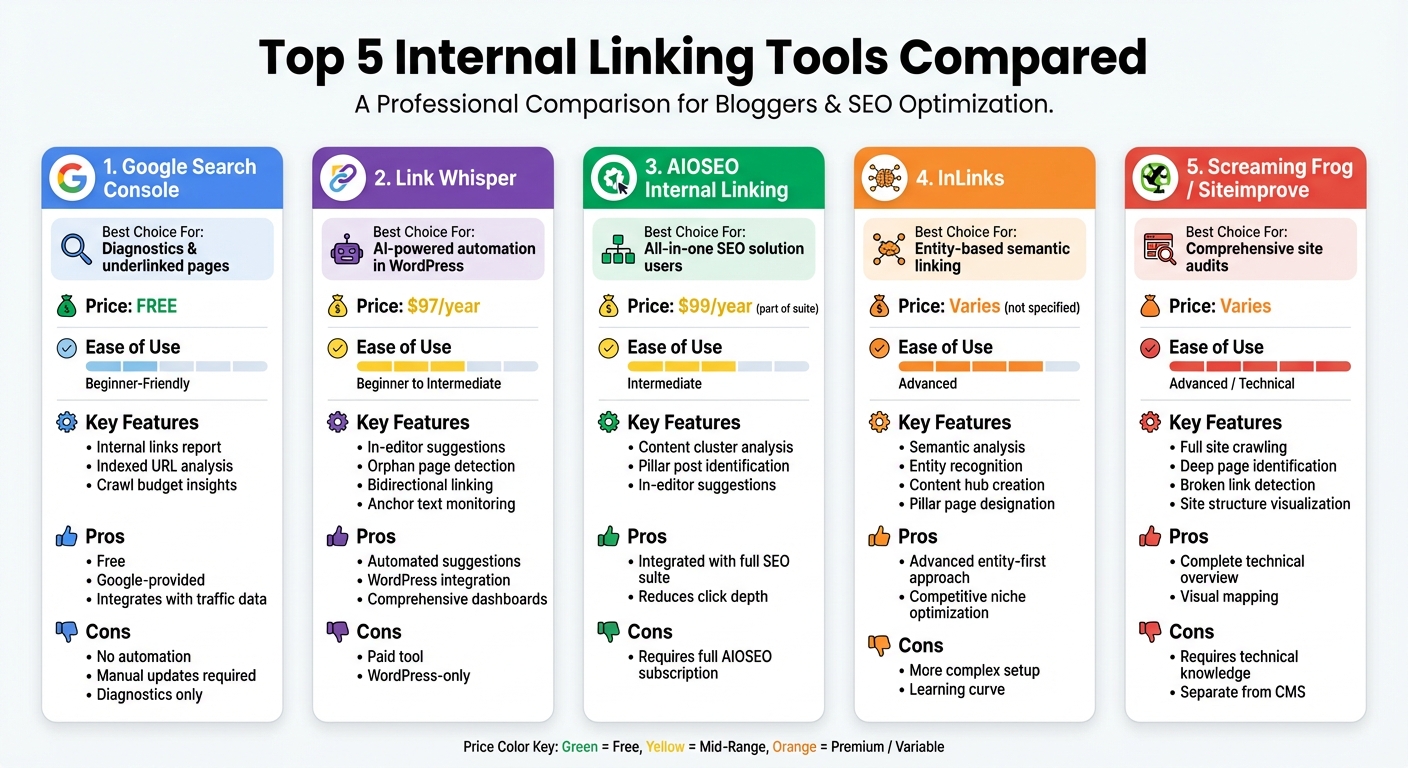
Comparison of Top 5 Internal Linking Tools for Bloggers
The right tools can make internal linking much easier and more effective, turning a time-consuming task into a streamlined process that improves your site’s crawlability. With features like orphan page detection, semantic linking, and in-editor suggestions, these tools can help you optimize your internal link strategy. Here are five essential tools that can take your internal linking game to the next level.
Google Search Console
Google Search Console is a free tool that provides a solid starting point for analyzing your site’s internal link structure. Its Internal Links report shows how many links point to each indexed URL, making it easier to spot underlinked pages that may not get enough attention from search engines, as well as overlinked pages (such as tag archives) that could be wasting your crawl budget. To identify underlinked pages, navigate to the links section, sort the internal links in ascending order, and export the list. From there, you can focus on adding contextual links from relevant, high-authority posts. While this tool is helpful for diagnostics, it works best when paired with plugins that can automate fixes.
| Pros | Cons |
|---|---|
| Free and provided directly by Google | Only displays indexed URLs, not your entire site |
| Highlights pages Google deems important | Offers no automation or in-editor suggestions |
| Helps prioritize high-value pages using traffic data | Requires manual updates in your CMS |
| Can integrate with other tools for deeper insights | Limited to diagnostics, not direct fixes |
If you’re looking for automation, the next tool simplifies manual linking within WordPress.
Link Whisper
Link Whisper is an AI-powered WordPress plugin created by Spencer Haws that identifies internal linking opportunities directly within your editor. It suggests links in two directions – linking from your current post to other relevant content and linking older posts back to your new article. The plugin also provides dashboards and reports to monitor total internal links, anchor text usage, and linking frequency. You can use it to find orphan posts, add contextual links, and even set up auto-linking for cornerstone content. Link Whisper can work alongside Google Search Console to identify issues like broken links and redirects. Pricing starts at $97 per year.
For bloggers already using an all-in-one SEO solution, the next option integrates linking into a broader toolkit.
AIOSEO Internal Linking
All in One SEO (AIOSEO) includes internal linking as part of its WordPress suite. It scans your content to highlight important pages – like pillar articles or lead-generation posts – that may need more internal links. The tool identifies gaps in your content clusters and suggests links to bridge them. As you write, in-editor suggestions recommend relevant posts to link to, based on your topic. If you’re already using AIOSEO for metadata or sitemaps (priced at $99 per year), its internal linking feature can help reduce click depth. You can define pillar posts, analyze supporting content for weak links, and interconnect posts to strengthen your topic clusters.
For a more advanced approach, the next tool focuses on semantic connections.
InLinks
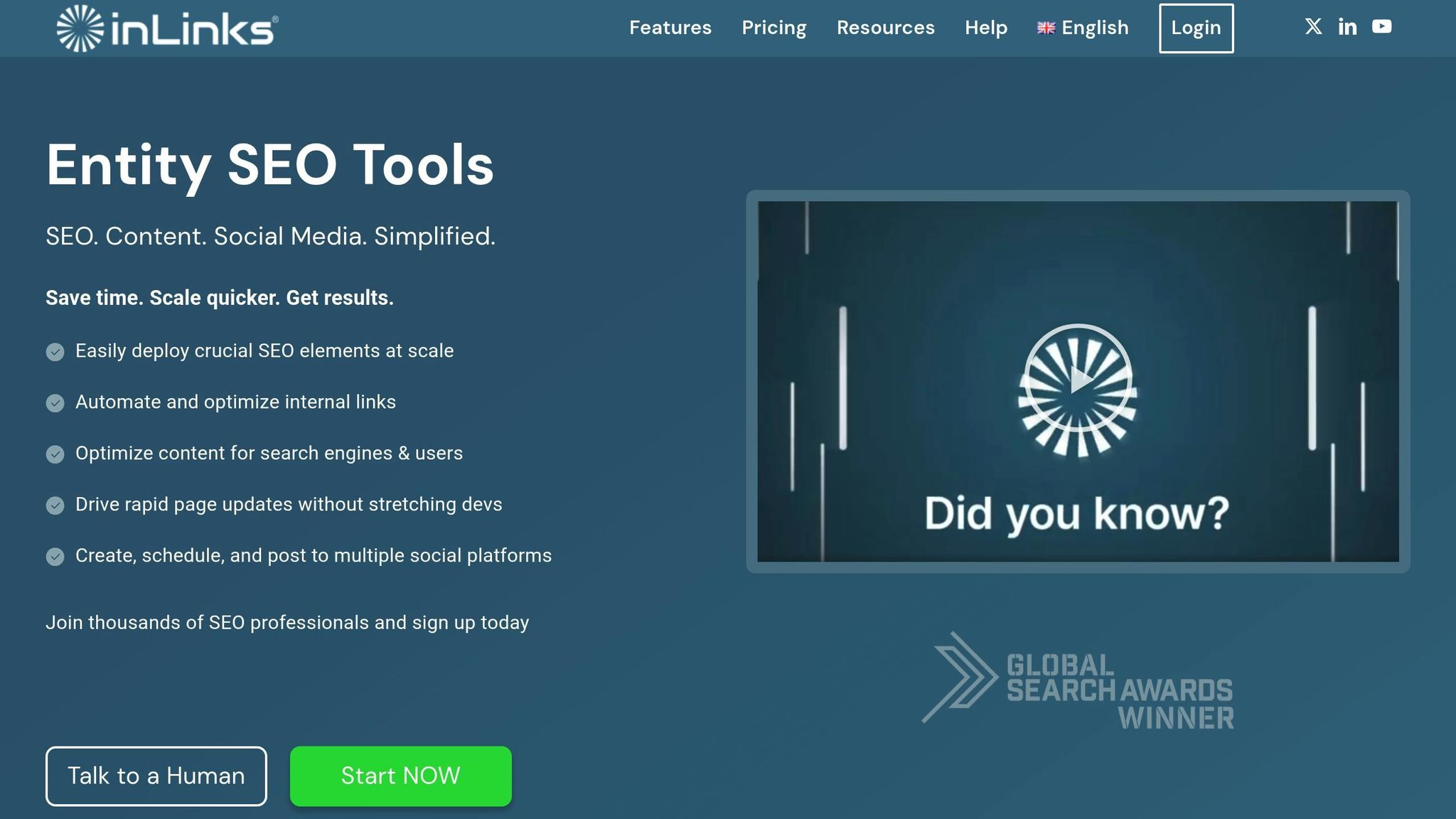
InLinks takes an entity-based approach to internal linking, using semantic analysis to connect pages based on related entities like people, places, and concepts – even when the phrasing differs. This allows you to create content hubs by designating a central pillar page and linking supporting posts around it. This entity-first strategy can help search engines better understand your site’s expertise, especially in competitive niches. To get started, connect your site to InLinks, perform an entity audit, and regularly update your internal links as you publish new content.
For a complete view of your site’s structure, audit tools provide invaluable insights.
Sitewide Audit Tools
Sitewide audit tools like Screaming Frog SEO Spider and Siteimprove crawl your site to mimic how search engines navigate it. These tools identify deep pages, broken links, redirect chains, and non-indexable URLs that still receive internal links, which can waste link equity. They also offer visualization features, such as crawl trees or diagrams, to map your site structure. For large blogs with hundreds or thousands of posts, these audits are essential for addressing technical issues before diving into more detailed linking strategies.
sbb-itb-112c64b
How Blogger Outline Supports Internal Linking
Blogger Outline takes internal linking from being an afterthought to a structured and repeatable process. It helps you audit your current content, identify key pages like pillar posts, supporting articles, and money pages, and create clear linking rules using tools like spreadsheets or mind maps. This approach eliminates guesswork, making it easy to spot issues like orphan pages or posts with too many links. Plus, it encourages building a routine – whether weekly or monthly – to ensure internal linking becomes a consistent part of your content workflow.
Building Content Hub Structures
Blogger Outline supports the hub-and-spoke model for organizing content. This method uses a central pillar page that links to related cluster posts. For example, a pillar page titled "Beginner’s Guide to Keto Diet" could link to posts like "Keto Grocery List", "Keto Snack Ideas", and "Keto Mistakes to Avoid." The platform provides examples of these structures and suggests anchor text patterns, making it easier for search engines to crawl and understand the relationships between your content. For blogs that already have a library of posts, Blogger Outline guides you in exporting URLs and organizing them by topic, creating a clear structure that aligns with your strategy.
Matching Tools to Your Blogging Strategy
Blogger Outline helps you choose internal linking tools based on your blog’s size and technical setup. For smaller blogs, it recommends starting with free tools like Google Search Console and basic crawlers, gradually adding tools like Link Whisper or AIOSEO Internal Linking as your content grows. For larger blogs, it suggests pairing sitewide audit tools with advanced options like InLinks to handle larger scales and topic clusters. Additionally, it connects tool features to your blogging goals. For monetized blogs, it shows how to prioritize links to money pages, product reviews, or high-EPMV content. For those building topical authority, it highlights tools that enhance content clustering and entity-based linking. This tailored guidance ensures your internal linking strategy evolves as your blog expands.
Conclusion
Internal linking plays a key role in helping search engines navigate your site, improving indexing and boosting rankings. By linking from high-authority pages to deeper or less-connected content, you ensure thorough indexing while strategically distributing page authority. Research shows that adding internal links to underlinked pages can lead to noticeable increases in organic traffic, with multiple studies confirming measurable improvements after implementing such changes.
The tools mentioned in this guide – Google Search Console, Link Whisper, AIOSEO, InLinks, and site audit platforms – simplify the process of identifying orphan pages, spotting linking opportunities, and maintaining a consistent internal linking strategy. These modern tools leverage AI and NLP to suggest contextually relevant links, going beyond basic keyword matching. This advanced approach helps create interconnected content clusters, refining your site’s structure and aligning with Google’s focus on topical authority and E-E-A-T. In a competitive digital landscape, these tools are invaluable for staying ahead.
To maximize results, make internal linking a continuous effort. Regularly audit orphan pages, develop pillar-based content hubs, and incorporate linking into your publishing workflow. Whether you’re managing a small blog or a large site with hundreds of posts, combining the right tools with a solid strategy can transform internal linking into a highly effective SEO tactic.
For even more support, Blogger Outline offers resources like SEO guides and content planning frameworks to help integrate these practices into your broader blogging strategy. By pairing structured workflows – such as hub-and-spoke models or quarterly audits – with the right tools, you can enhance crawlability, improve rankings, and drive traffic. Check out Blogger Outline’s strategies to build an internal linking system that grows alongside your blog.
FAQs
How can internal linking tools help boost SEO?
Internal linking tools play a key role in boosting your site’s SEO by simplifying the process for search engines to crawl and index your pages. They ensure that your most important pages are well-connected, which helps spread link equity more effectively throughout your site.
On top of that, these tools enhance user experience by directing visitors to relevant content. This not only keeps them engaged but also reduces bounce rates – both of which send positive signals to search engines and can improve your rankings.
What key features should I look for in an internal linking tool?
When choosing an internal linking tool, prioritize features that improve efficiency and boost your site’s SEO. Opt for tools that offer automated link suggestions to streamline your workflow, customizable anchor text to better target keywords, and site structure analysis to uncover linking opportunities. Additionally, tools with user-friendly link management systems make it simpler to monitor and update links, keeping your site optimized and search engine-friendly.
How can I use internal linking tools to fix orphan pages on my site?
Internal linking tools are a great way to spot and connect orphan pages – those pages on your site that don’t have any links pointing to them from other areas. By linking these pages to related, high-traffic content, you make them easier for both users and search engines to find. This not only boosts your site’s crawlability but also helps these pages get indexed more efficiently.
It’s also important to include these pages in your site’s navigation and sitemap. Doing so increases their visibility and ensures they play a role in improving your site’s overall SEO performance.