

Internal linking is one of the easiest ways to improve your WordPress blog’s SEO and user experience. But managing links manually can be time-consuming and error-prone, especially as your site grows. That’s where internal linking tools come in – they help automate the process, saving you hours while boosting your site’s performance.
Here’s what you need to know:
- Why internal linking matters: It improves SEO, helps search engines crawl your site, and keeps readers engaged by guiding them to related content.
- Common problems: Manual linking takes too long, orphaned pages go unnoticed, and over-linking can hurt readability.
- Top tools: Plugins like Yoast SEO, AIOSEO, Link Whisper, and Internal Link Juicer simplify internal linking with features like link suggestions, orphaned page detection, and keyword-based automation.
- Costs: Prices range from free to $99/year, depending on the tool and features.
Quick takeaway: If you’re running a WordPress blog, using an internal linking tool can save hours of work, fix overlooked issues, and improve your site’s SEO. Below, we’ll break down the top tools and how to use them effectively.
Automate Internal Linking on WordPress: LinkWhisper Internal Linking Tool Review
Common Internal Linking Problems for WordPress Bloggers
Manually managing internal links might work if you only have a handful of posts. But once your blog grows to hundreds – or even thousands – of articles, it becomes a painstaking process. You end up spending hours that could be better used creating new content, all while overlooking countless linking opportunities.
Manual Linking Takes Too Much Time
Publishing a new post means combing through your entire archive to find relevant articles to link to. Then, you have to revisit older posts to add links pointing to your new content. It’s a tedious cycle. Jared Bauman, Co-Founder of 201Creative.com, sums it up perfectly:
"At our SEO agency, building internal links has long been a trouble spot. We need internal links that are highly relevant, and creating those is very time consuming."
Think about it: if you have 500 posts and spend just 2 minutes per article searching for linking opportunities, you’re looking at over 16 hours of work – just for one round of updates.
Pages Without Links Get Ignored
Some posts, known as "orphan pages", have no inbound internal links. These pages are essentially invisible to both readers and search engines. Without any links pointing to them, Google’s crawlers might never find these pages, meaning they won’t get indexed or ranked – no matter how strong the content is.
This is no small issue. Research shows that websites with well-structured internal links see much higher organic traffic compared to those with poorly organized linking strategies.
Too Many Links Hurt Readability
While under-linking is a problem, over-linking creates its own set of headaches. Adding too many links can overwhelm readers and dilute the SEO value of your content. Studies suggest that the sweet spot for internal linking is around 2-5 links per 1,000 words. Exceeding 100 internal links on a single page can hurt both user experience and search engine rankings.
Over-linking can also create technical issues, especially on mobile devices. When clickable elements are packed too closely together, users may struggle to tap the right link, leading to errors flagged in Google Search Console. Repeatedly linking the same keyword to the same page can even trigger spam warnings from Google.
Hard to Track Link Quality
Without automation, keeping tabs on link quality becomes a daunting task. Broken links, orphan pages, and link authority often go unnoticed until a reader flags them or you painstakingly check every URL manually. James Dooley, Founder of FatRank.com, explains the challenge:
"Link Whisper has been a god send plugin to allow my team to improve the website’s silo… it helps in one easy to read place to check orphan pages."
Monitoring diverse, relevant anchor text manually is equally exhausting. For many bloggers, the sheer effort involved leads them to abandon systematic internal linking altogether.
These challenges underscore the importance of automated internal linking tools. The right tools can streamline the process, save valuable time, and boost your SEO efforts.
Best Internal Link Tools for WordPress Blogs
Finding the right plugin can turn hours of manual linking into a quick, seamless process. These tools use AI to spot linking opportunities, making it easier to strengthen your site’s SEO structure. Here’s a breakdown of some of the best internal link tools for WordPress blogs.
Yoast SEO: Smart Link Suggestions
Yoast SEO Premium offers an internal linking sidebar that appears as you edit your posts. This feature analyzes frequently used unique word combinations in your content and suggests relevant articles you can link to. Simply drag and drop these suggestions into your editor to connect posts effortlessly. As Yoast puts it:
"The internal linking tool is a great help in picking those articles that fit your new post best… even if they’re written a while ago or by someone else."
You can also mark your most important articles as "Cornerstone Content", ensuring they are prioritized in link suggestions. With over 13 million users and a 4.6/5 star rating on WordPress.org [12, 23], Yoast SEO is a favorite among bloggers aiming to optimize their site structure. Pricing starts at $99/year for the core plugin or $118.80/year for the full Premium suite.
AIOSEO: Automated Link Opportunities
AIOSEO takes automation to another level with its Link Assistant. This tool scans your entire site and provides contextual link suggestions through a centralized dashboard [19, 20]. You can add links with just one click, without needing to open the editor. It also identifies orphaned posts – those with no internal links – and flags them for attention. Additionally, the Domains Report monitors outbound links that may not contribute to SEO [20, 22].
AIOSEO’s internal linking features can help boost organic traffic by as much as 40%. One user shared:
"Whether you’re a beginner or an SEO expert, AIOSEO is a game-changer. It keeps all of my sites optimized without the hassle."
With over 3 million users and 100 million downloads, AIOSEO’s Link Assistant is included in Pro plans starting at $49.60.
Link Whisper: Real-Time Recommendations
Link Whisper provides real-time AI-powered suggestions while you write. It examines the top 20 prominent words in your post to identify contextually relevant linking opportunities. These suggestions appear in a sidebar, allowing you to add links with a single click. The plugin also supports Auto-Linking, enabling you to set rules for linking specific keywords across your site.
A standout feature is the Link Health Dashboard, which tracks orphaned pages, broken links, and overall link quality. James Dooley, Founder of FatRank.com, highlights its value:
"Link Whisper has been a god send plugin to allow my team to improve the website’s silo… it helps in one easy to read place to check orphan pages."
In 2021, hittingthegolfball.com used Link Whisper to fix their internal link structure, achieving a consistent growth rate of 20% per month. Trusted by over 40,000 businesses across 134 countries and rated 4.3/5 stars on WordPress.org, Link Whisper starts at $77 for a single site license.
Internal Link Juicer: Keyword-Based Linking
Internal Link Juicer automates linking by focusing on keywords. You assign specific keywords to each post, and the plugin automatically links them whenever they appear in your content, saving you from manual effort. It also includes blacklist and whitelist options, giving you control over which pages receive links while maintaining site speed.
For budget-conscious bloggers, Internal Link Juicer offers a free version. The Pro version is available for $69.99/year or a one-time fee of $209.99 [7, 23]. To keep anchor text natural, configure multiple keyword variations when using this tool.
sbb-itb-112c64b
Tool Comparison: Which Internal Linking Plugin to Choose
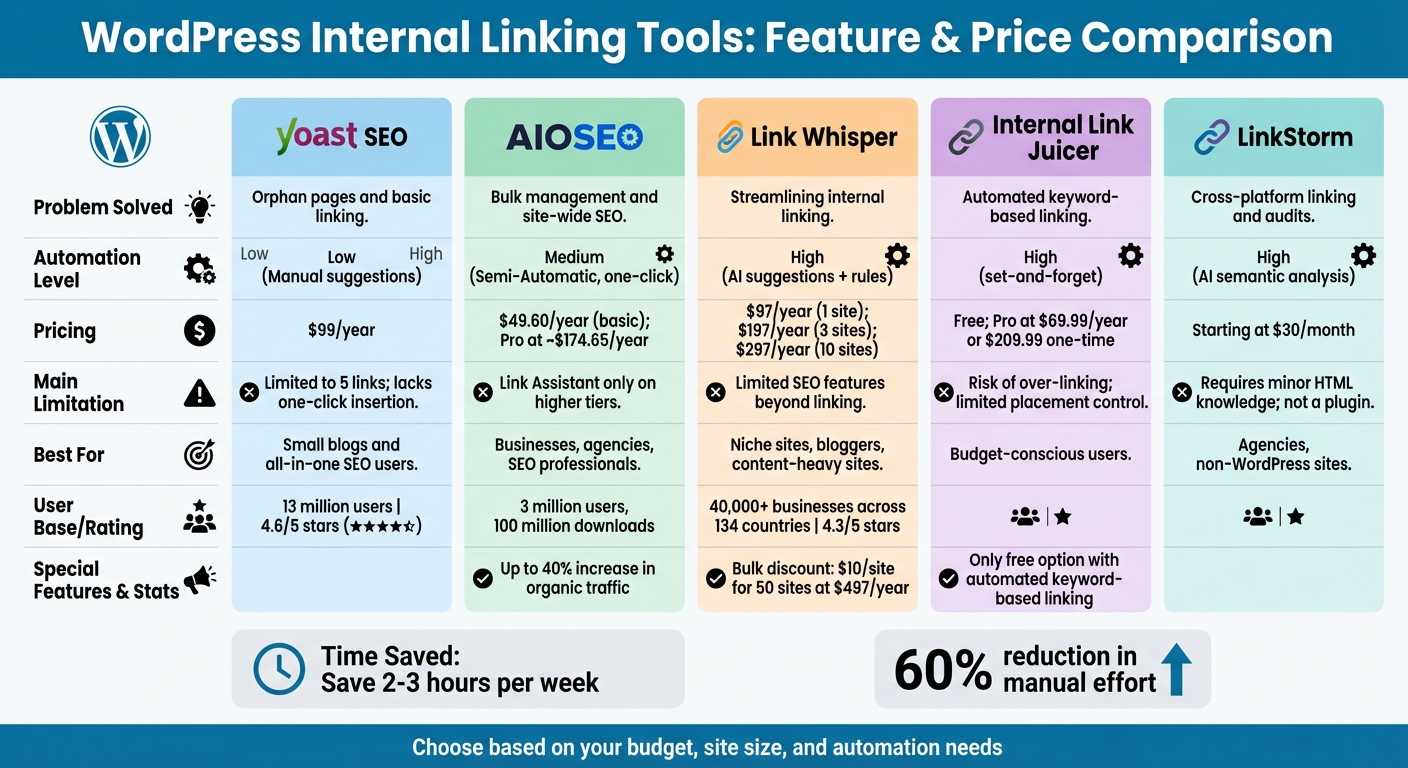
WordPress Internal Linking Tools Comparison: Features, Pricing & Best Use Cases
Picking the right internal linking tool comes down to factors like your budget, the size of your site, and how much automation you need. Some plugins provide AI-driven suggestions that you manually approve, while others can automatically insert links based on keywords you set. These automated tools can save you 2–3 hours a week.
If you’re after a more comprehensive SEO toolkit, Yoast SEO and AIOSEO might be worth considering. Both offer a range of SEO features beyond internal linking. On the other hand, Link Whisper focuses exclusively on internal linking automation, making it a strong choice for that specific task.
For those watching their budget, Internal Link Juicer stands out. Its free version includes automated keyword-based linking – something you won’t find in the free versions of Yoast or AIOSEO. However, it does require you to set predefined keywords, unlike Link Whisper or AIOSEO, which are more flexible.
If you’re managing a site with a lot of content, tools like Link Whisper and AIOSEO can handle bulk linking and offer one-click features, saving time when dealing with hundreds of posts. Plus, Link Whisper provides a steep discount for scaling up to multiple sites, with licenses dropping to just $10 per site when you go from one site ($97/year) to 50 sites ($497/year).
Here’s a quick breakdown of the features and limitations of the top tools:
Comparison Table
| Tool | Problem Solved | Automation Level | Pricing (USD) | Main Limitation | Best For |
|---|---|---|---|---|---|
| Yoast SEO | Orphan pages and basic linking | Manual (suggestions) | $99/year | Limited to 5 links; lacks one-click insertion | Small blogs and all-in-one SEO users |
| AIOSEO | Bulk management and site-wide SEO | Semi-Automatic (one-click) | $49.60/year (basic); Pro at ~$174.65/year | Link Assistant only on higher tiers | Businesses, agencies, SEO professionals |
| Link Whisper | Streamlining internal linking | High (AI suggestions + rules) | $97/year (1 site); $197/year (3 sites); $297/year (10 sites) | Limited SEO features beyond linking | Niche sites, bloggers, content-heavy sites |
| Internal Link Juicer | Automated keyword-based linking | High (set-and-forget) | Free; Pro at $69.99/year or $209.99 one-time | Risk of over-linking; limited placement control | Budget-conscious users |
| LinkStorm | Cross-platform linking and audits | High (AI semantic analysis) | Starting at $30/month | Requires minor HTML knowledge; not a plugin | Agencies, non-WordPress sites |
The right tool can streamline your workflow and strengthen your blog’s internal linking structure, which is crucial for improving your SEO performance.
How to Set Up and Use Internal Linking Tools
Installation and Configuration Steps
Start by installing your chosen plugin and running its "SEO Data Optimization" scan. This will analyze your content and create a baseline for internal linking recommendations.
Next, configure the tool to suit your site. Choose the post types (like posts, pages, or products) and statuses (such as published or scheduled) you want the tool to work with. Highlight your most important articles by marking them as "Cornerstone Content", ensuring they get prioritized in link suggestions.
Each tool has its own approach to automation. For instance, Link Whisper and AIOSEO allow you to insert links with a single click, while Yoast SEO requires manual copying. On the other hand, Internal Link Juicer automatically links preselected keywords across your content.
Don’t overlook orphaned posts – pages with no internal links pointing to them. Run an "Orphaned Posts" report to identify these pages; they’re often overlooked by search engines and need immediate attention. To keep anchor text natural, use exclude settings to block certain words from being suggested as links. If you’re using Link Whisper, you can connect it to Google Search Console to access organic traffic and keyword data directly within the plugin. This feature helps you prioritize linking to high-performing pages.
Once everything is set up, shift your focus to monitoring and improving your internal linking strategy.
Tracking Results and Making Improvements
After setting up the tool, it’s important to track your internal linking performance regularly. Schedule monthly audits using your "Link Health Dashboard" to spot orphaned posts and broken links. Tools like AIOSEO and Link Whisper provide detailed reports on internal, outbound, and affiliate links for each post. They also send real-time alerts for 404 errors, which can negatively impact your SEO.
"The plugin gives amazing options to place internal links on old articles and helps in one easy-to-read place to check orphan pages and webpages which might need some extra link juice." – James Dooley, SEO Expert, FatRank.com
When publishing new content, use the "Inbound Internal Suggestions" report to find older, authoritative posts that should link to your new article. Review AI-generated anchor text to ensure it’s descriptive and engaging, avoiding generic phrases like "click here". Some tools also track click-through rates on internal links, helping you identify which links drive actual engagement.
To measure progress, Link Whisper offers regular performance reports. By integrating with Google Search Console, you can refine anchor text using keywords that already bring in traffic. Fix broken links directly in the tool and set up auto-linking rules for important keywords to maintain a strong site structure that search engines can easily navigate.
Conclusion
Managing internal links on WordPress can be a lot easier with the right tools. Automated internal linking tools can reduce manual effort by about 60% while improving your site’s SEO performance. These plugins help identify orphaned content that might otherwise be missed, suggest relevant anchor text as you write, and create a clear content hierarchy that benefits both users and search engines.
For example, AIOSEO is trusted by over 3 million website owners worldwide, while Link Whisper supports more than 40,000 businesses across 134 countries. These tools not only save time but also improve SEO by distributing link equity to key pages and preventing issues like 404 errors.
"Internal link building is one of the most underused strategies in SEO and Link Whisper takes the hard work out of it by making intelligent suggestions that are easy to manage." – Mark Condon, Founder, Shotkit.com
Whether you opt for a comprehensive tool like AIOSEO (starting at $49.60/year), a specialized plugin like Link Whisper ($97/year), or a free option such as Internal Link Juicer, these solutions can help you build a stronger internal linking structure. Run an orphaned content report, review AI-generated suggestions, and experience how these tools can transform your workflow and enhance your blog’s SEO. There’s no better time to get started!
FAQs
How do internal linking tools boost SEO for WordPress blogs?
Internal linking tools play a crucial role in boosting SEO by streamlining your site’s structure. They make it easier for search engines to navigate and index your content effectively. These tools ensure your pages are interconnected in a way that helps search engines grasp the relationships between your posts and pages.
When you add internal links thoughtfully, you’re not just helping search engines – you’re also guiding your visitors to key content. This can lower bounce rates and create a smoother experience for users. Over time, this approach can enhance your search rankings and bring more organic traffic to your WordPress blog.
What are the main differences between popular WordPress internal linking plugins?
The key differences among popular WordPress internal linking plugins come down to their automation capabilities, user experience, and extra SEO features.
Take Link Whisper, for example. It stands out with its AI-driven automated suggestions, making it a great choice for quickly setting up internal links and reviewing your site’s link structure.
Meanwhile, Yoast SEO focuses on internal linking suggestions based on content analysis. It also includes tools like breadcrumbs to enhance your site’s structure, catering more to those who prioritize content-focused SEO strategies.
Then there’s Rank Math, which blends internal linking tools with a wider range of SEO features, such as schema markup and position tracking. This makes it an appealing option for users seeking an all-in-one SEO solution.
Ultimately, the right plugin depends on what you need most – whether it’s automation, content insights, or a more comprehensive SEO toolkit.
What are orphaned pages, and how can I fix them on my WordPress site?
Orphaned pages are those lonely corners of your website that lack internal links pointing their way. Without these connections, both users and search engines struggle to find them. The good news? Fixing them is a straightforward process. Tools like internal link analysis plugins or SEO platforms can help you spot these pages. They scan your site, identify unlinked content, and even offer suggestions on where to add links.
Once you’ve tracked down these pages, take a closer look at their content. Then, strategically link to them from relevant posts or pages across your website. This simple step not only improves site navigation but also helps search engines make sense of how your content is connected.