

Affiliate tracking errors can cost publishers and affiliates thousands of dollars each month, with tracking failures impacting up to 14% of commissions. These issues often stem from broken links, ad blockers, browser privacy settings, or JavaScript and pixel failures. By 2026, browser-based tracking faces even greater challenges, with data loss rates projected at 35–40%, while server-side tracking reduces losses to just 5–8%.
Here’s how you can tackle and prevent these errors:
- Check your affiliate links: Ensure URLs include all required parameters like
clickidormerchant_id. Regular audits can catch broken links or outdated redirects. - Address ad blockers and privacy settings: Switch to server-side tracking to bypass browser restrictions and improve accuracy.
- Fix JavaScript and pixel errors: Test your tracking scripts and pixels on order confirmation pages. Ensure they aren’t blocked by caching or security settings.
- Monitor discrepancies: Compare affiliate dashboard data with tools like Google Analytics. A discrepancy above 15% signals an urgent need for action.
- Automate and audit regularly: Set up alerts for sudden conversion drops and conduct monthly tracking audits to catch system decay.
Server-side tracking is becoming the standard for accurate data collection, ensuring you don’t lose revenue due to browser limitations. Paired with routine audits and real-time alerts, these strategies can safeguard your affiliate earnings and optimize campaign performance.
Why Your Affiliate Links Don’t Work on Instagram? What to do Instead.
sbb-itb-112c64b
What Causes Affiliate Tracking Errors
Affiliate tracking errors arise from technical issues that disrupt the flow of data between your website, the user’s browser, and the merchant’s system. Pinpointing the root causes of these errors allows you to address them quickly, minimizing revenue loss.
The primary causes of tracking errors are broken tracking links, browser privacy tools, and JavaScript or pixel failures. Each of these disrupts the tracking process in unique ways. While a tracking discrepancy of 0–10% is generally acceptable in the industry, anything above 15% indicates a serious issue requiring immediate action. Below, we’ll dive into each of these common causes.
"Most issues come down to misconfiguration… Missing pixels or scripts, broken URL parameters, and domain errors." – Kamila Łuksza-Szpyt, Managing Director, Voluum
Broken or Incorrect Tracking Links
A single typo in an affiliate URL can break the entire tracking system. Manual mistakes or improperly configured link cloaking plugins often strip critical parameters like {clickid}, merchant_id, or website_id, rendering the tracking system ineffective. Another common scenario occurs when an affiliate program goes offline – this can happen if the merchant’s account balance dips below zero or their software subscription lapses. These technical issues lead to lost sales attribution and, ultimately, lost revenue.
Ad Blockers and Browser Privacy Settings
With over 40% of internet users employing ad-blocking software, tools like AdBlock, Ghostery, and Noscript often block JavaScript files that resemble tracking scripts. These tools also target specific domains or URL structures linked to affiliate networks, further complicating tracking efforts.
Additionally, browser privacy features such as Safari‘s Intelligent Tracking Prevention (ITP) limit first-party cookies to just 7 days, while third-party cookies are often blocked outright. Apple’s App Tracking Transparency (ATT) framework allows users to opt out of tracking entirely, and private browsing modes delete cookies and block tracking scripts by default.
"The browser tracking wars have had a severe impact on affiliate revenue since 2018." – Ernie St. Gelais, WordPress & Divi Expert
These tools and settings make it harder to track conversions accurately, resulting in lost commissions on legitimate sales.
JavaScript Errors and Pixel Problems
JavaScript errors can stop tracking scripts from functioning properly. These errors often arise from conflicts between plugins, themes, or outdated shopping cart software. When the script doesn’t execute, conversions fail to be recorded – even if a user completes a purchase.
Tracking pixels, often 1×1 images, face their own challenges. They need to be placed on the "Order Complete" or confirmation page to function. If this page doesn’t load fully, the pixel won’t fire, meaning the sale won’t be tracked. A common mistake occurs when a non-secure (HTTP) pixel is placed on a secure (HTTPS) page, which browsers frequently block. Additionally, caching plugins and script optimization tools can interfere with tracking cookies, especially if the tracking tag isn’t excluded from caching. These issues directly impact conversion tracking accuracy, cutting into affiliate earnings.
It’s estimated that up to 14% of affiliate commission is lost due to a mix of technical issues and consent-related tracking limitations. Moreover, about 5% of advertisers’ tracking setups experience changes or "decay" each month as websites undergo updates.
How to Diagnose Tracking Errors
Once you’re aware of what causes tracking issues, the next step is figuring out how to catch them before they start eating into your revenue. The good news? You don’t need fancy software to get started. Most tracking problems can be uncovered with free browser tools and a bit of data comparison.
A focused diagnosis can help you spot issues early. For example, if there’s a big mismatch between clicks in your affiliate dashboard and sessions in Google Analytics, it’s a big warning sign. Missing URL parameters (like ?avad= or ?click_id=) after clicking an affiliate link or sudden conversion drops that don’t match your traffic trends are also red flags. Experts suggest a 0–10% discrepancy is fine, 10–15% should be monitored, and anything above 15% calls for a full audit.
"Downtimes happen. Unfortunately, they happen to affiliate marketing tracking too. Simply put, these are the times when your affiliate program doesn’t track affiliate-referred conversions." – Geno Prussakov, Founder, AM Days
Use Browser Developer Tools
Your browser’s developer tools (press F12) are one of the quickest ways to troubleshoot tracking issues. Head to the Network tab, enable "Preserve log", and click on your affiliate link. Look for tracking requests – successful ones will show a 200 status code, while broken ones will show 404 or 500 errors.
Switch over to the Console tab to catch JavaScript errors. Messages like "Uncaught ReferenceError" or "Blocked by client" often mean something’s wrong, with the latter usually pointing to ad blockers. For cookie-based tracking, check the Application tab (or Storage tab) to see if cookies like affwp_ref or avmws are being set correctly when you click a referral link. Missing cookies or incorrect expiry dates are common culprits.
To avoid skewed results from cached scripts or existing cookies, run these tests in Incognito mode with caching disabled. This simulates a first-time visitor’s experience.
Compare Dashboard and Analytics Data
Beyond browser troubleshooting, comparing data across platforms can reveal additional insights. Look at impressions, clicks, and conversions from your ad platform, tracking software, and affiliate dashboard. Small differences are normal since platforms use different time zones and attribution models, but large gaps usually signal a problem.
For instance, in 2025, an iGaming brand used Voluum to fix tracking gaps, leading to a 25% jump in recorded first-time deposits by resolving data mismatches. Similarly, RedTrack collaborated with XenTraffic to improve attribution accuracy after iOS 14 updates, achieving a 22% rise in conversion rates and a 30% boost in ROAS on Facebook.
Check if click_id or subid values are being recorded in your affiliate dashboard. Missing values suggest misconfigured tracking parameters. Setting up performance alerts to notify you of sudden drops (e.g., a 30% drop in conversions within hours) can help catch failures in real time. Also, confirm that settings like "Ignore Referrals with Zero Amounts" aren’t filtering out valid leads.
| Discrepancy Level | Action Required |
|---|---|
| 0–10% | No immediate action needed |
| 10–15% | Monitor closely for trends |
| 15%+ | Audit pixels, postbacks, and URLs immediately |
Spotting these gaps now ensures you’re ready to fix them effectively later.
Run Tracking Link and Pixel Audits
Routine testing can stop small tracking issues from turning into major revenue losses. Regularly audit your links and pixels by clicking affiliate links and checking if the destination URL includes required parameters. For pixel-based tracking, place a test order and monitor the browser console to see if the "Conversion Tag" fires with the correct values expected by your affiliate network. If the pixel doesn’t fire, double-check that it’s placed on the correct "Order Complete" page and that no caching plugins are interfering. Also, note that non-secure (HTTP) pixels on secure (HTTPS) pages are often blocked by modern browsers.
Since 5% of advertiser tracking setups change monthly due to website updates, monthly audits are crucial. Aiming for 90–95% tracking accuracy is realistic given the challenges posed by privacy tools and ad blockers.
How to Fix and Prevent Tracking Errors
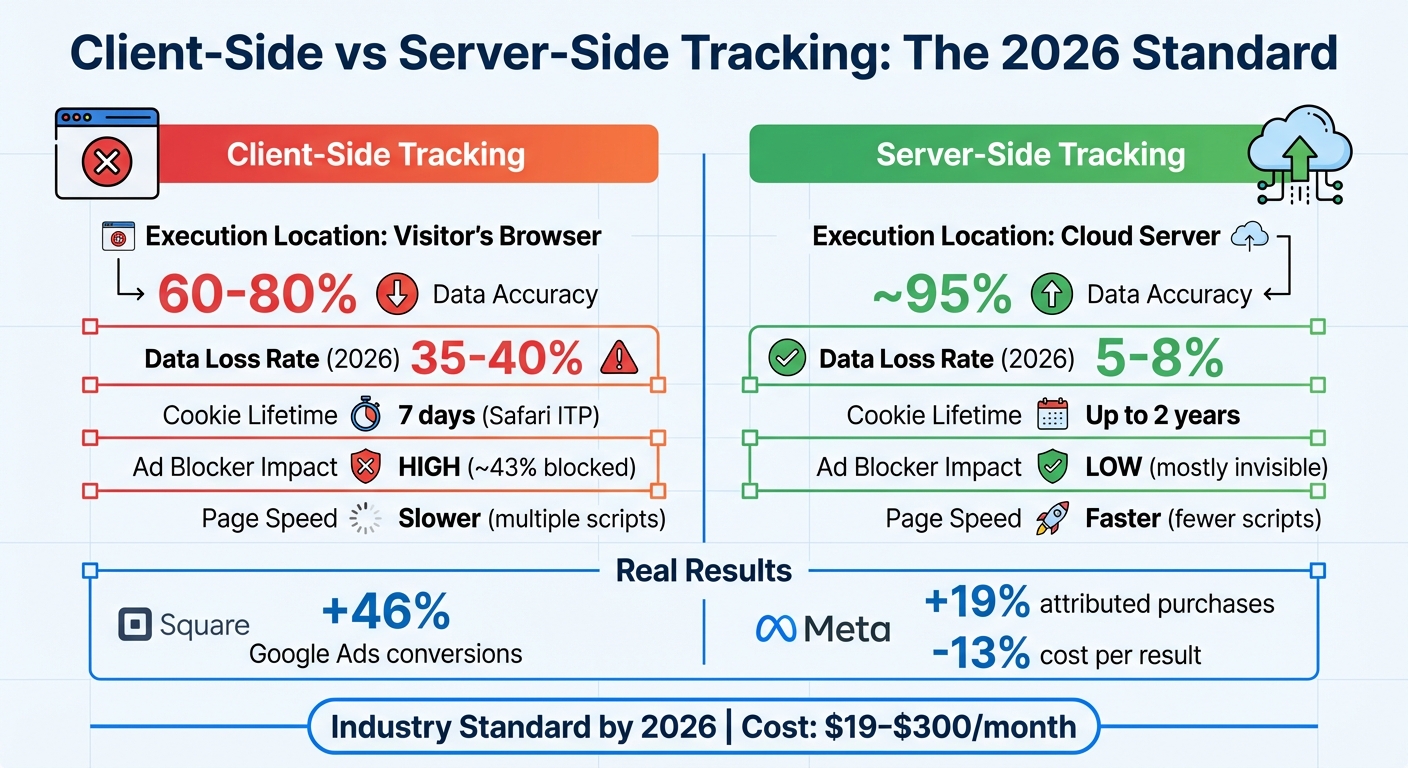
Client-Side vs Server-Side Affiliate Tracking: Data Accuracy and Performance Comparison
Addressing tracking errors quickly is essential to recover lost revenue and avoid future issues. With around 5% of tracking setups changing every month, staying on top of reviews and incorporating automation can help minimize losses. In fact, tracking decay can result in up to 14% of affiliate commissions being lost.
"One of the most frequent scenarios (when affiliate tracking goes down) is connected with merchants revamping their websites, but failing to properly implement the affiliate program’s tracking on the new version of their sites."
– Geno Prussakov, Founder, AM Days
If you’re facing tracking issues, here’s how you can fix them and ensure your revenue stays protected.
Check and Update Your Tracking Code
Start by reviewing your tracking code to ensure it aligns with your network’s specifications. Many networks provide default formats with required parameters like merchant_id or website_id. Use Debug Mode to monitor real-time console messages – look for indicators such as "Commission Factory: master tag loaded for advertiser XXXXX." If this message doesn’t appear on every page, your integration may need adjustments.
Affiliate links can go inactive over time due to website updates, product removals, or expired promotions – often within two years. To avoid this, conduct monthly audits to fix broken or outdated links. Test your tracking by completing a full purchase using various payment methods and browsers. This ensures the conversion tag on the order completion page is triggered with the correct values. If you’re using redirects, opt for 302 (temporary) redirects instead of 301 (permanent) to separate affiliate links from your permanent SEO structure.
Switch to Server-Side Tracking
If ad blockers or browser privacy settings are disrupting your tracking, consider switching to server-side tracking. This method sends data directly from your server to the affiliate platform, bypassing browser-based restrictions and improving accuracy. While client-side tracking can lose 30–40% of conversion data, server-side tracking achieves approximately 95% accuracy. For example, Square saw a 46% increase in Google Ads conversions, and Meta reported 19% more attributed purchase events with a 13% lower cost per result after adopting server-side tracking.
To implement server-side tracking, set up a first-party subdomain (e.g., track.yoursite.com) so cookies are treated as first-party by browsers. Run both client-side and server-side tracking simultaneously for 2–4 weeks to validate data accuracy before fully migrating critical events. Costs for managed solutions range from $19 to $90 per month, while self-hosted options on platforms like Google Cloud Run typically cost $120–$300 per month.
| Aspect | Client-Side Tracking | Server-Side Tracking |
|---|---|---|
| Execution Location | Visitor’s Browser | Cloud Server |
| Data Accuracy | 60–80% | ~95% |
| Cookie Lifetime | 7 days (Safari ITP) | Up to 2 years |
| Ad Blocker Impact | High (~43% blocked) | Low (mostly invisible) |
| Page Speed | Slower (multiple scripts) | Faster (fewer scripts) |
Automate and Test Data Collection Regularly
Automation can act as a safety net, complementing immediate fixes and server-side tracking. Set up real-time alerts to notify you of sharp conversion drops, such as a 30% decrease within three hours. Use a "canary" link – a dedicated test link to a sample offer – and click it weekly to complete a test conversion, ensuring your system is functioning correctly. Tools like Zapier or Make can route conversion data from your trackers to spreadsheets or ad platforms for reconciliation.
Establish a routine audit schedule to stay ahead of potential issues. Check dashboards daily for click and postback health, review Earnings Per Click trends and dead links weekly, and perform in-depth audits of ROI and Lifetime Value monthly. Finally, test tracking functionality with and without user cookie consent to confirm that compliance settings aren’t unintentionally blocking legitimate data.
Tools and Resources for Better Tracking
Once you’ve resolved errors, the next step is choosing the right tracking tools to maintain performance. These tools are the backbone of a successful affiliate program, helping you differentiate between revenue lost to errors and actual profits. With the affiliate marketing industry expected to hit $48 billion by 2027, precision in tracking is more important than ever.
Blogger Outline offers a wealth of resources and expert advice to help you navigate the often-confusing world of affiliate tracking tools. They emphasize server-to-server (S2S) tracking, a 2026 standard that avoids browser limitations by sending conversion data directly from the merchant’s server. This method is especially important given that 5-15% of affiliate traffic is fraudulent and traditional cookie-based tracking is becoming less reliable.
When evaluating tracking tools, look for features like first-party cookies and detailed parameter tracking using UTMs and Sub-IDs. Some standout options include:
- Voluum: Handles over 500,000 daily clicks, starting at $69/month.
- ClickMagick: Offers automated link rotators to replace broken links, starting at $49/month.
- Pretty Links: Ideal for WordPress users, with weekly "Link Health" scans to catch broken redirects before they cost you commissions.
"If you can’t track it, you can’t scale it." – Passive Earnings Hub
Regular link audits are also crucial to prevent revenue loss. Tools like PageRadar, Screaming Frog (free for up to 500 URLs, $259/year for unlimited), and AMZ Watcher ($16.63/month) can help you identify issues like 404 errors or out-of-stock pages that could hurt your bottom line. Considering that even a 1-second delay in a tracking redirect can lead to a 10-20% drop in mobile traffic, consistent audits are non-negotiable.
These tools and strategies ensure your tracking remains accurate, allowing you to fine-tune your affiliate campaigns. With Blogger Outline’s guidance, you can set up automated monitoring systems and standardize UTM naming conventions – critical steps for keeping your data reliable as your program grows.
How to Monitor Tracking Performance
Daily Dashboard Checks
Make it a habit to review your affiliate dashboard every day. According to Trackonomics, this daily routine helps you catch potential problems early, preventing them from turning into major revenue losses. It’s not about obsessing over every detail but about identifying unusual patterns quickly.
Start by examining your click-to-sale ratios. For instance, if clicks are spiking but sales have dropped to zero, it might signal issues like a broken redirect or a pixel failure. To verify accuracy, compare the data from your affiliate dashboard with Google Analytics and your internal CRM. Any discrepancies should stay within your usual benchmarks. If they don’t, it’s time to dig deeper and audit your entire system. As AM Navigator explains, tracking errors can lead to "low overall affiliate program statistics… [and] decrease earnings for the affiliates who drove them".
Also, keep an eye on your top-performing affiliates or links. A sudden dip in their performance might point to problems like expired URLs or geo-blocking. These daily checks are your first line of defense and set the stage for more thorough weekly reviews.
Weekly Audits and Alert Setup
While daily checks catch immediate issues, weekly audits give you a deeper understanding of your tracking systems. These audits are essential for spotting what Moonpull describes as "half-life" decay – natural tracking degradation caused by merchants updating their websites. This gradual decline can result in up to 14% of affiliate commissions slipping through the cracks.
To stay ahead of these problems, set up automated alerts through tools like email, Slack, or SMS. These alerts can notify you of sharp drops in conversions, so you can act quickly. As Samir Belabbes from PageRadar emphasizes, "A single broken high-converting affiliate link can cost hundreds or thousands of dollars per month".
Additionally, perform test transactions across different browsers and devices to ensure everything is functioning correctly. Be vigilant for sudden spikes in clicks, as these could indicate bot traffic. Tools like PrettyLinks and Lasso can simplify this process by running weekly "Link Health" scans. These scans detect 404 errors and send instant notifications, saving you time and effort. The goal here is straightforward: resolve tracking issues before they start affecting your revenue.
Conclusion
Affiliate tracking errors can wreak havoc on both your earnings and your relationships. A single broken link – especially one tied to a high-converting offer – could drain thousands of dollars from your revenue each month. Even smaller mistakes can snowball into noticeable financial losses. Worse yet, when affiliates notice tracking issues, it erodes their trust. If they suspect their conversions aren’t being recorded accurately, they may see it as financial instability – or even dishonesty – and shift their focus to competitors with more dependable systems.
The solution? Stay ahead of the problem. As Chris Tradgett from Moonpull highlights:
"Affiliate commission often follows a half-life decay curve and therefore any program needs regular monitoring to rebase it to the start of the decay curve".
With nearly 5% of tracking setups failing each month due to things like website updates and structural changes, a "set it and forget it" mindset simply doesn’t work.
Server-side tracking is a game-changer. Unlike client-side tracking, which suffers from high data loss, server-to-server tracking reduces that loss to just 5–8%. This method sidesteps ad blockers and browser privacy restrictions, ensuring more accurate data. Pairing this with routine audits and real-time alerts can turn tracking into a strength rather than a vulnerability.
But technical solutions alone aren’t enough. Transparency is equally important when things go wrong. Stick to the "Three As": Acknowledge the issue promptly, Apologize to your affiliates, and Act by compensating them based on historical performance data. This openness preserves trust, helping turn short-term campaigns into lasting partnerships. Without precise tracking, you’re left making budget decisions based on guesses – and in an industry valued at over $18.5 billion, that’s a gamble you don’t want to take.
FAQs
How can I confirm my affiliate link is passing the correct parameters?
To ensure your affiliate link is working as intended, start by checking that the URL contains tracking parameters such as via, ref, affiliate, or a, along with their correct values. Open the link in a browser or incognito mode to verify that these parameters stay intact after clicking. Finally, cross-check that your tracking system accurately records these parameters in your analytics or affiliate dashboard to avoid tracking errors.
When should I switch from client-side to server-side tracking?
Switch to server-side tracking if you’re dealing with problems like inaccurate data, gaps caused by browser restrictions or ad blockers, or challenges from stricter privacy rules. Server-side tracking helps improve data accuracy and attribution, especially as client-side tracking becomes less reliable due to modern privacy updates. If you’re seeing mismatched metrics or missing conversions, it might be time to migrate. This approach ensures more precise tracking and prepares you for changes in browser and privacy policies.
What’s the fastest way to spot tracking issues before I lose commissions?
The fastest way to spot tracking problems is by using automated tools to monitor your affiliate links. These tools can quickly identify broken links, sluggish redirects, or any performance hiccups that might hurt your earnings. By routinely auditing your links with reliable plugins or software, you can address issues early, keep your links working smoothly, and safeguard your commissions from unnoticed errors.