
If you’re managing a WordPress blog, optimizing for on-page SEO is crucial to improve search rankings and user experience. From keyword placement to structured data, these tools simplify the process and save you time. Here’s a quick guide to the top options:
- Rank Math: Offers real-time SEO scoring, AI-powered fixes, and extensive Schema support. Free and paid plans start at $95.88/year.
- Yoast SEO: Known for its traffic light system for SEO and readability checks. Premium starts at $118.80/year.
- All in One SEO (AIOSEO): Features TruSEO scoring, internal linking tools, and advanced Schema options. Paid plans begin at $49.60/year.
- SEOPress: Includes unlimited keyword analysis and white-label features. Pro version costs $49/year.
- The SEO Framework: Lightweight and privacy-focused with automated settings. Extensions start at $84/year.
- Slim SEO: A no-configuration tool for basic SEO tasks. Pro version starts at $59/year.
- Blogger Outline: Provides WordPress-specific SEO strategies and guides, complementing existing tools.
Quick Comparison
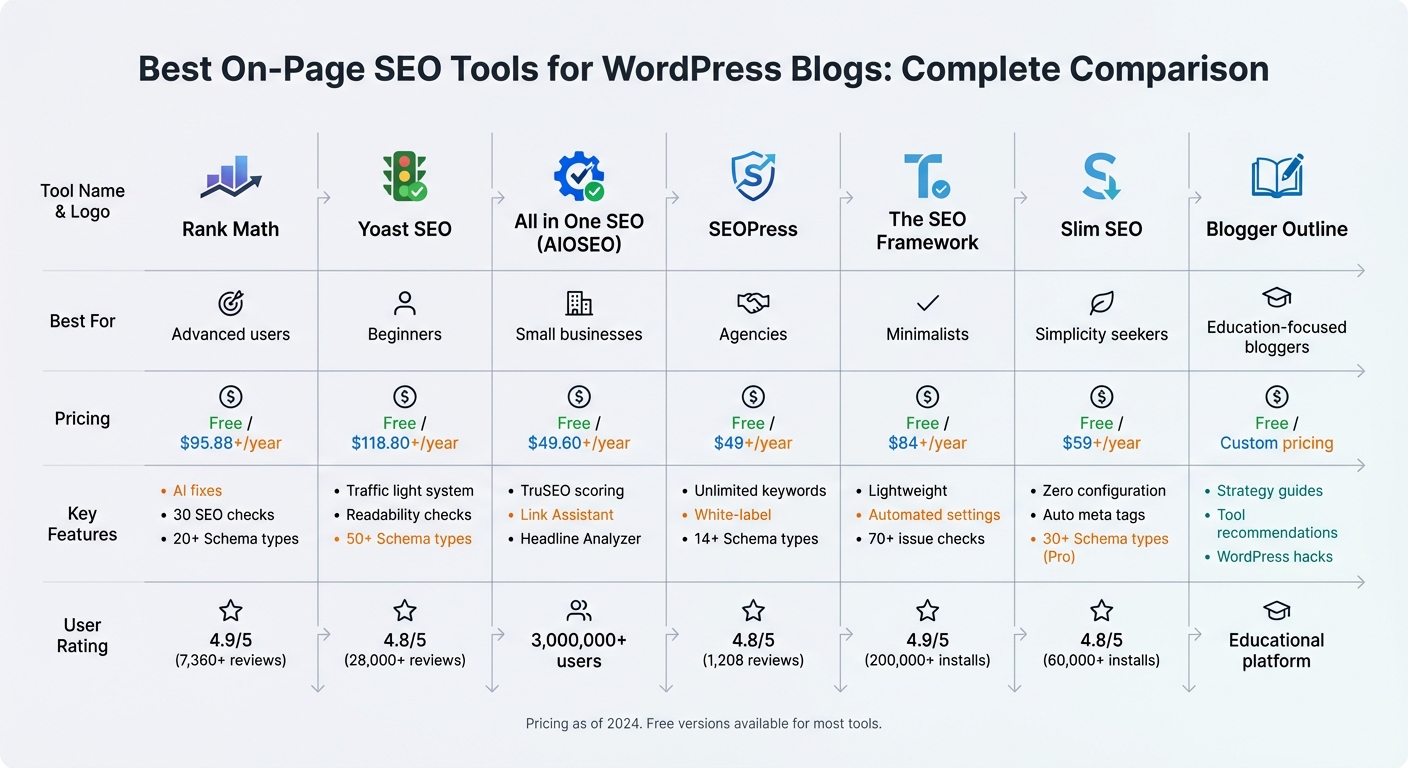
| Tool Name | Key Features | Free/Paid Pricing | Best For |
|---|---|---|---|
| Rank Math | AI fixes, Schema, 30 SEO checks | Free/$95.88+/year | Advanced users |
| Yoast SEO | Readability checks, Schema | Free/$118.80+/year | Beginners |
| AIOSEO | TruSEO, Link Assistant | Free/$49.60+/year | Small businesses |
| SEOPress | Unlimited keywords, white-label | Free/$49+/year | Agencies |
| The SEO Framework | Lightweight, automated settings | Free/$84+/year | Minimalists |
| Slim SEO | Automated, no setup needed | Free/$59+/year | Simplicity seekers |
| Blogger Outline | Strategy guides, recommendations | Free/Custom pricing | Education-focused bloggers |
Each tool has unique strengths, so choose based on your goals, budget, and technical needs. Free options cover basics, while premium plans unlock advanced features like AI-driven suggestions and detailed Schema control.
WordPress On-Page SEO Tools Comparison: Features, Pricing and Best Use Cases
Yoast SEO vs Rank Math vs All In One SEO
sbb-itb-112c64b
1. Rank Math
Rank Math provides a real-time SEO score (ranging from 0–100) directly within your WordPress editor, making it simple to assess your content’s optimization level before hitting publish. It conducts 30 SEO checks per post, analyzing factors like keyword placement in headings and URLs, as well as readability. Results are displayed through a color-coded checklist: green for good, yellow for average, and red for poor.
Real-time On-Page SEO Analysis
The "Fix with AI" feature takes care of SEO issues automatically, saving you the hassle of manual corrections. As you edit, you can preview how your content will appear on Google and social media platforms. The plugin’s Content AI provides real-time suggestions for keywords, headings, and questions to include. Additionally, the Image SEO module automatically generates ALT text and titles based on your preferences, speeding up the optimization process and ensuring your posts are ready for search engines right away.
Schema Markup Support
Structured data plays a key role in improving search visibility, and Rank Math supports over 20 Schema types, such as Article, Product, Recipe, FAQ, HowTo, and Local Business. You can assign a default Schema type for all blog posts through the Titles & Meta settings or use the Schema Generator in the post sidebar to customize fields for specific content. The plugin also includes a "Test with Google" button, which sends your JSON-LD code to Google’s Rich Results Testing Tool for instant validation. For faster setup, you can import Schema from a competitor’s URL or a JSON-LD snippet.
Integration with WordPress
Rank Math works seamlessly with Gutenberg, Classic Editor, Elementor, and Divi. Its one-click import tool simplifies the process of migrating settings and metadata from other plugins like Yoast SEO, All in One SEO, or SEOPress. The setup wizard also connects your site to Google Search Console, enabling real-time tracking of your performance.
Free and Paid Plan Options
The free version of Rank Math includes over 18 Schema types, unlimited focus keyword support (defaulting to 5), and all 30 SEO tests. For additional features, the PRO plan is available at $95.88 per year, offering keyword tracking for up to 1,000 terms, advanced Google Analytics 4 integration, and access to an expanded Schema library with more than 840 types. For agencies or larger teams, the Business plan costs $299.88 annually and supports up to 100 client sites, along with tracking for 20,000 keywords. With an impressive 4.9/5 rating from over 7,360 reviews, users frequently praise the free version’s robust features and lightweight functionality.
2. Yoast SEO
Yoast SEO uses a traffic light system to flag SEO and readability issues with red, orange, or green indicators. It simplifies tasks like keyword management, readability checks, and metadata optimization. By setting a focus keyphrase, users can have the tool evaluate over 15 factors, such as keyphrase density, placement in subheadings, and whether it appears in the introduction. The plugin also assesses readability in real time, analyzing sentence length, passive voice usage, transition words, and paragraph structure. With more than 10 million active installations and a 4.8/5 rating from nearly 28,000 reviews, Yoast SEO has become a trusted choice for many.
Real-time On-Page SEO Analysis
Yoast provides live analysis directly in the WordPress editor and Elementor, offering optimization suggestions as you write. The free version supports a single focus keyphrase per post, while the Premium version allows up to five keyphrases and includes AI Optimize for improved keyword distribution. As one user put it:
"that omnipresent yet silent content editor and writing coach we all need".
In addition to live feedback, Yoast ensures your structured data is accurate and well-organized.
Schema Markup Support
Yoast automatically creates a unified Schema.org graph that links your content with author and organizational details, rather than producing fragmented code snippets. It supports over 50 schema types and applies "Article" and "Author" schema to blog posts by default, helping search engines better understand your content. Dedicated Gutenberg blocks for FAQs and How-To guides include proper structured data, increasing the chances of earning rich results. The free version includes the full Schema Framework, while the Premium version adds advanced schema options for Local SEO, Video SEO, and News SEO.
Integration with WordPress
Yoast integrates seamlessly with WordPress and tools like Elementor, ACF, and Google Site Kit. Regular updates every two weeks keep the plugin aligned with search engine changes. Premium users gain access to a redirect manager, which automatically creates 301 redirects when a page is deleted or moved, preventing 404 errors and preserving SEO value. This feature is highly valued, with 58% of Premium users identifying it as the most helpful. The plugin also offers real-time internal linking suggestions, recommending related posts as you write.
Free and Paid Plan Options
The free version includes basic SEO and readability analysis, XML sitemaps, and support for one focus keyphrase per post. Yoast SEO Premium, priced at $118.80 per year, adds features like AI-driven title and description generation, support for up to five keyphrases, a redirect manager, and 24/7 email and chat support. For e-commerce sites, Yoast WooCommerce SEO costs $178.80 per year and includes product-specific schema for price, stock, and reviews. The top-tier Yoast SEO AI+ plan, at $358.80 per year, offers brand visibility tracking and optimization tailored for large language models.
3. All in One SEO (AIOSEO)
Since its launch in 2007, All in One SEO (AIOSEO) has gained the trust of over 3,000,000 WordPress site owners. Its standout feature is the TruSEO Score, a rating out of 100 that evaluates the on-page SEO quality of each post and page. Along with the score, the plugin provides a practical checklist to help you optimize your content. It checks for the target keyword in critical areas like the SEO title, meta description, introduction, subheadings, and image alt text. Plus, the TruSEO Highlighter flags issues such as passive voice and overly long sentences, making it easy to fix them on the spot.
"This plugin has greatly improved my site’s search engine visibility… I love the real-time analysis that optimizes content as you write." – @anavato
AIOSEO also comes with a Headline Analyzer, which scores your titles and suggests ways to improve click-through rates. Its Link Assistant scans your site for internal linking opportunities and recommends anchor text with a simple click. Together, these tools streamline the process of refining headlines and managing internal links.
Schema Markup Support
AIOSEO goes beyond content optimization by simplifying structured data implementation. Its Next-Gen Schema Generator supports over 20 schema types, including Article, Product, FAQ, How-To, Recipe, Review, and Event. The plugin auto-extracts titles, descriptions, and images to create JSON-LD markup, which is Google’s preferred format. This structured data can qualify your pages for rich snippets like star ratings, prices, and FAQs, potentially boosting click-through rates. To ensure accuracy, AIOSEO includes built-in validation tools so you can verify your schema is correctly configured before publishing.
"Schema markup gives search engines a verified, structured summary of your content… This boosts your visibility, builds trust, and increases click-through rates." – AIOSEO
Integration with WordPress
AIOSEO integrates effortlessly with popular page builders such as Elementor, Divi, SeedProd, Avada, and WPBakery. It also supports headless WordPress through the REST API and automatically generates sitemaps for XML, RSS, Video, and Google News to help your pages get indexed quickly. Additionally, the plugin’s Redirection Manager supports 19 different redirect types (like 301, 302, and 307), helping you avoid 404 errors when pages are moved or deleted.
"AIOSEO allowed us to appear very quickly on the first pages of Google and Bing in a very competitive market. We even received congratulations from Google!" – @danielkarena
Free and Paid Plan Options
AIOSEO offers both free and paid plans. The Lite version includes meta titles, descriptions, XML sitemaps, and the ability to focus on one keyword per post. For more features, paid plans start at $49.60 per year for the Basic plan, which covers one site and unlocks unlimited focus keywords and SEO audits. The Plus plan (at $99.60/year) supports up to three sites and adds Local SEO and SEO revisions, while the Pro plan ($199.60/year) includes tools like the Link Assistant, 404 tracking, and Video sitemaps for up to 10 sites. The Elite plan ($299.60/year) is designed for larger operations, supporting up to 100 sites and offering integrations with Google Search Console and Search Statistics. With thousands of 5-star reviews on WordPress.org, AIOSEO continues to be a favorite among users.
4. SEOPress
SEOPress has made a name for itself with over 350,000 active installations and more than 1,200 five-star reviews on WordPress.org. Its Content Analysis feature is a standout, scanning your site’s source code to run 14 different SEO checks. These checks cover areas like headings, meta robots, titles, descriptions, social metas, internal and outbound links, structured data, and image alt text. One major advantage? SEOPress allows you to define an unlimited number of target keywords for analysis, even in the free version. The results are sorted by priority, giving you clear steps to improve your content.
"What’s great about SEOPress is that not only does it cater to beginners, but it offers content analysis with unlimited keywords, even for users on the free plan." – Neil Patel
The Universal SEO Metabox saves time by letting you edit metadata and run SEO analysis directly within popular page builders like Elementor, Divi, Bricks, and the WordPress Block Editor. No need to jump back to the dashboard. Plus, the Refresh Analysis button updates your SEO score instantly after you tweak your content. For PRO users, the Google Suggest feature provides the top 10 long-tail keyword suggestions right inside the tool, helping you find new content ideas faster.
Schema Markup Support
SEOPress doesn’t stop at content analysis – it also enhances your site’s visibility with advanced schema support. The PRO version supports more than 14 structured data types, such as Article, Product, Local Business, Review, Event, Recipe, and FAQ. You can set up automatic schema rules for entire site sections based on post types or categories, or create custom schema manually using JSON-LD. A built-in validation tool ensures your schema is error-free before search engines see it. For local businesses, SEOPress includes a Local Business schema and a matching WordPress widget to align what search engines and visitors see.
"Schema markup is one of the smartest ways to help your WordPress site stand out in search results. By giving search engines a clearer picture of what your content is about, you set yourself up for better visibility and more relevant traffic." – Benjamin Denis, CEO of SEOPress
Integration with WordPress
SEOPress works seamlessly with major page builders like Elementor, Divi, Gutenberg, Oxygen, Bricks, and Beaver Builder. It’s also multisite-ready and integrates with Google Search Console, showing clicks and position data right in your WordPress dashboard. The PRO version includes a Site Audit feature that runs 52 SEO tests across 13 categories, scanning up to 1,000 URLs in about 5 minutes. Additional features include a Redirect Manager (supporting 301, 302, 307, 410, and 451 redirects) and an internal linking tool powered by TF-IDF, which suggests up to five related links.
Free and Paid Plan Options
SEOPress offers a free version packed with useful features like unlimited keyword content analysis, XML/HTML sitemaps, and social previews for Facebook and X. The PRO version starts at $49 per year for one site and unlocks advanced tools like AI-powered metadata generation (leveraging OpenAI, Google Gemini, Claude, Mistral AI, and DeepSeek AI), advanced schema (15+ types), WooCommerce SEO, site audits, broken link detection, and Google News and Video sitemaps. Pricing for five sites is $59 per year, while unlimited site licenses cost $149 annually. Every paid plan includes a 14-day money-back guarantee. SEOPress has earned a stellar 4.8/5 star rating on WordPress.org from 1,208 reviews.
"SEOPress delivers solid SEO functionality without the bloat or high costs of its main competitors." – Shivani M, BlogVault
Next up, we’ll look at another tool designed to streamline on-page SEO for WordPress sites.
5. The SEO Framework
The SEO Framework is a popular WordPress plugin with over 200,000 active installations and an impressive 4.9/5 rating on WordPress.org. Known for its speed and automation, this plugin is designed to be lightweight and efficient. It’s 12 times faster than many competitors, adding just 5–10 milliseconds per page compared to the typical 50–80 milliseconds. Plus, its frontend code is under 10 KB and requires only one database query per page, far fewer than the 3–6 queries most other tools demand. Let’s break down how its features make on-page SEO smoother and faster.
Real-time On-Page SEO Analysis
The SEO Framework offers a color-coded SEO Bar that highlights over 70 potential issues at a glance. Each color has a specific meaning: red flags errors, yellow signals warnings, green marks success, blue provides information, and gray indicates undefined statuses. Hovering over these icons reveals actionable suggestions without needing to open each post individually.
Additional tools like the pixel counters in the SEO meta box help you keep title and description lengths within optimal limits, avoiding truncation in search results. Version 5.1.0 even introduced a Canonical URL Notation Tracker, which displays the canonical URL as a placeholder for easier editing. These features not only save time but also improve page performance.
"Every page and term is checked against more than 70 issues. Instant, color-coded alerts reveal issues at a glance." – The SEO Framework
Schema Markup Support
The plugin includes basic schema markup for free, such as Breadcrumb, Organization, and Person, which helps improve site structure and search result presentation. For more advanced schemas like Local Business, FAQ, or NewsArticle, you’ll need to upgrade to a paid extension. Additionally, you can assign a primary category to posts, which determines the breadcrumb path displayed by search engines.
Integration with WordPress
One of the standout features of The SEO Framework is its seamless integration with the WordPress dashboard. It avoids unnecessary branding and is designed with GDPR compliance in mind – it doesn’t collect data, use cookies, or make external requests. This plugin is also compatible with major page builders, making it a go-to choice for SEO professionals who rely on tools like Ahrefs or Semrush.
Free and Paid Plan Options
The core plugin is available for free, but there are paid extensions for users who need additional features. Pricing starts at $7 per month (billed annually at $84/year) for the Pro plan, which covers 2 sites. The Business plan supports up to 20 sites at $17 per month, while the Agency plan handles up to 200 sites for $27 per month. The main differences between these tiers include the number of site activations, monthly API requests (ranging from 5,000 to 500,000), and the level of support provided.
Next, we’ll dive into another tool built to simplify on-page SEO for WordPress blogs.
6. Slim SEO
Slim SEO takes care of essential on-page SEO tasks automatically, making it ideal for those who prefer simplicity. With over 60,000 active installations and a 4.8/5 rating on WordPress.org, this plugin is built around a "decision over option" approach. Instead of overwhelming users with settings, it handles SEO tasks right out of the box [73, 76]. As Simon Blackbourn describes it:
"Great SEO plugin for WordPress, just install it and you’re done. No need to sift through complex settings and unnecessary features".
Automated On-Page SEO and Real-Time Features
The free version of Slim SEO skips the traditional real-time analysis dashboard, focusing instead on automation. It generates meta tags, Open Graph tags, and Twitter Cards without requiring user input [73, 76]. For those looking for more, Slim SEO Pro (starting at $59/year for one website) offers a Writing Assistant that provides real-time feedback on keywords, images, links, and readability while drafting posts [75, 76]. It also includes Real-time Link Reports to analyze links as you write and Link Health Monitoring to identify broken or redirected URLs [75, 76].
Built-in Schema Markup
Slim SEO simplifies structured data by automatically creating schema for Website, Webpage, Breadcrumbs, Article, and Person without any manual setup [79, 76]. It links articles with their authors, organizations, and websites automatically. The Pro version takes this further with a visual schema builder and more than 30 pre-built schema types [75, 76]. This functionality integrates effortlessly with WordPress, making it a standout feature.
Seamless WordPress Integration
Slim SEO is ready to go as soon as you activate it – no configuration needed. It works smoothly with popular page builders like Elementor, Divi, and Beaver Builder, as well as multilingual plugins such as WPML and Polylang. It also supports WooCommerce [81, 82]. To prevent duplicate markup, it replaces built-in SEO features in themes like Genesis. As Jakub Knytl notes:
"It’s the most lightweight SEO plugin I’ve tested. For large sites where every query and database row counts it’s the best solution at the moment".
Pricing Options: Free and Pro Plans
The core Slim SEO plugin is free and available on WordPress.org. For users seeking more advanced tools, Slim SEO Pro offers three pricing tiers: Personal at $59/year for one website, Freelancer at $119/year for up to 10 websites, and Agency at $179/year for unlimited websites. The Pro version adds features like the Writing Assistant, a visual schema builder, Google Search Console integration, and contextual internal link suggestions [75, 76].
7. Blogger Outline

Blogger Outline is a platform designed to provide bloggers with both educational resources and actionable WordPress SEO strategies. Its focus goes beyond just technical SEO, offering insights into content creation, audience growth, and blog monetization. What sets Blogger Outline apart is its dual emphasis on strategy and practical application, making it a go-to resource for bloggers aiming to integrate SEO seamlessly into their WordPress workflow.
Integration with WordPress
Blogger Outline doesn’t function as a standalone plugin. Instead, it complements your existing WordPress setup by offering curated recommendations and WordPress-specific techniques. These actionable strategies can be directly implemented into your blog, enhancing its performance. The platform provides free guides that walk you through optimizing your WordPress blog and premium consulting services for personalized advice tailored to your unique setup and goals. These WordPress hacks work in tandem with other technical tools, ensuring a well-rounded approach to optimization.
Free and Paid Plan Options
Blogger Outline caters to a wide range of bloggers, from beginners to those seeking advanced support.
- The Free Resources plan includes access to blog posts, guides, and tool recommendations. Topics cover blogging tips, SEO strategies, and WordPress-specific hacks.
- The Premium Consulting plan offers a more personalized experience, with advanced strategies for SEO and monetization, available at custom pricing.
- The Tools Recommendations feature, available for free, helps you identify the best tools – such as writing aids, SEO plugins, and analytics platforms – to enhance your WordPress blog.
What makes Blogger Outline particularly useful is its educational focus. It doesn’t just tell you what tools to use but explains how and why to use them effectively. This approach empowers bloggers to make informed decisions, rather than simply relying on automated solutions. Whether you’re just starting out or looking to take your blog to the next level, Blogger Outline offers resources that align with your WordPress needs.
Tool Comparison Table
Compare key on-page SEO features side by side. This summary highlights the distinct advantages of each tool, as outlined earlier.
| Tool Name | Best For | Free/Paid Status | Key On-Page Features | Ease of WordPress Integration |
|---|---|---|---|---|
| Rank Math | Advanced users & Schema needs | Freemium (Pro: $5.75/month) | 18+ Schema types, Fix with AI button, unlimited focus keywords, redirect manager | High (Setup wizard with migration tools) |
| Yoast SEO | Beginners & Readability | Freemium (Premium: $99/year) | Traffic light SEO/readability analysis, 1 focus keyword (free), Schema.org integration | High (First-time configuration wizard) |
| All in One SEO | Small businesses & Internal linking | Freemium (Starts at $49.60/year) | Link Assistant with automated suggestions, TruSEO score, Headline Analyzer, Local SEO tools | High (Setup wizard with smart recommendations) |
| SEOPress | Agencies & White-labeling | Freemium (Pro: $49/year) | Ad-free dashboard, broken link checker (Pro), white-labeling options | High (Intuitive installation wizard) |
| The SEO Framework | Minimalists & Privacy | Freemium (Extensions: ~$7/month) | Preconfigured SEO settings, no tracking, lightweight code, automated meta tags | High (Sane defaults, minimal configuration) |
| Slim SEO | Performance-obsessed minimalists | 100% Free | Automated meta tags, zero configuration, basic schema, lightweight footprint | Outstanding (Zero configuration needed) |
| Blogger Outline | Education & Strategy | Free resources + Premium consulting | WordPress-specific guides, tool recommendations, SEO strategies, monetization insights | Complements existing plugins (not a standalone tool) |
Pricing varies across these tools. Slim SEO stands out as completely free, while Rank Math Pro is among the most affordable premium options, starting at $5.75/month (billed annually at about $69/year). Both SEOPress Pro and AIOSEO are priced under $50/year, making them budget-friendly for most users. Meanwhile, Yoast SEO Premium, at $99/year, is on the higher end, but its 4.8/5 star rating from 27,790 reviews on WordPress.org suggests that many users find the cost worthwhile.
For those prioritizing simplicity, Slim SEO excels with its no-configuration setup. If you’re switching from another plugin, both Rank Math and AIOSEO offer migration wizards to make the process easier. On the other hand, Blogger Outline takes a different approach by offering strategies and guidance to enhance your existing tools rather than functioning as a plugin itself.
Conclusion
Picking the right on-page SEO tool for your WordPress blog boils down to your budget, technical know-how, and specific goals. If you’re just getting started, free versions of tools like AIOSEO, Rank Math, or Yoast SEO can handle the basics, such as creating XML sitemaps and optimizing meta tags – enough to help your content get indexed and start ranking. For those looking for more advanced capabilities like schema markup, AI-driven recommendations, or automated internal linking, premium plans starting around $49.60 per year offer a range of features at an accessible price point. These options ensure you can align your choice with your content strategy.
With 93% of online experiences beginning on a search engine and over 75% of users never venturing beyond the first page, mastering SEO is essential. The right tool can save you time by automating repetitive tasks, flagging technical issues like broken links, and providing live feedback as you work in WordPress. Whether your priority is speed (WP Rocket), ease of use (Slim SEO), or in-depth analysis (Rank Math), there’s a tool that can fit seamlessly into your workflow.
Start with free versions to cover the essentials, and only upgrade when advanced features become necessary. For more detailed advice on integrating these tools into your broader content strategy, Blogger Outline offers WordPress-specific guides and monetization tips. The goal is to choose one tool that meets your current needs, avoid cluttering your site with overlapping plugins, and focus on producing content that genuinely addresses your audience’s search intent.
FAQs
Do I need more than one SEO plugin?
Most websites can get by with just one all-in-one SEO plugin to cover essential optimization tasks. These plugins are designed to handle the majority of what your site needs. That said, if you have unique requirements, you might consider using additional specialized tools. Just be cautious – installing multiple full-scale plugins can cause conflicts and slow down your site’s performance.
What is the best tool for Schema markup?
Schema Pro is a powerful tool for adding Schema markup, designed to work seamlessly with WordPress. Its automated features make the process straightforward, making it a go-to choice for bloggers aiming to improve their on-page SEO with minimal effort.
When should I pay for an SEO plugin?
When premium features such as AI-driven suggestions, comprehensive audits, schema markup, or round-the-clock support bring noticeable benefits to your website, it might be worth considering a paid SEO plugin. This is especially true for commercial or competitive websites that need advanced tools beyond what free options offer – like detailed analysis or automated technical solutions. Investing in a premium plugin can boost your search rankings and help you stand out in a crowded market.