

Internal linking can boost your SEO – if done right. But common mistakes like using vague anchor text, overloading pages with links, or creating orphan pages can hurt your rankings. Here’s a quick summary of the 9 most frequent errors to avoid:
- Generic Anchor Text: Phrases like "click here" confuse users and search engines. Use descriptive, keyword-rich text instead.
- Over-Optimized Anchor Text: Avoid stuffing exact-match keywords into links; keep usage under 5% of total anchors.
- Keyword-Stuffed Anchors: Long, repetitive keyword phrases in links disrupt readability and can lead to penalties.
- Irrelevant Links: Linking to unrelated pages weakens site structure and confuses users.
- Too Many Links: Overloading a page with links dilutes authority and wastes crawl budget.
- Orphan Pages: Pages with no internal links are hard to find and rank poorly.
- Deeply Buried Pages: Important pages should be no more than 3 clicks from the homepage.
- Links in Header Tags: Avoid making headers clickable; it confuses crawlers and users.
- Misused Noindex/Nofollow Tags: Incorrectly applied tags block link authority and harm SEO.
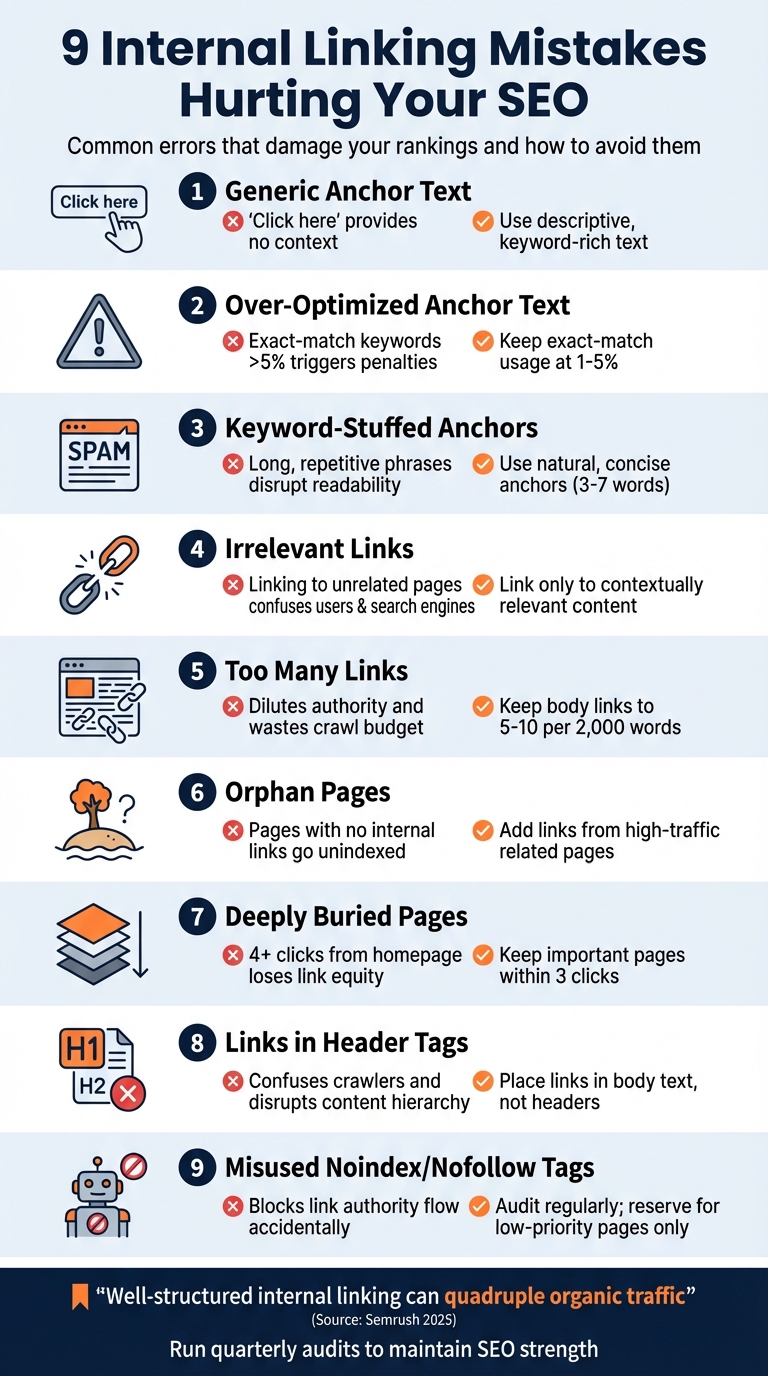
9 Internal Linking Mistakes That Hurt SEO Rankings
Why Your Internal Links Aren’t Actually Optimized: Cyrus Shepard (Zyppy)
1. Using Generic Anchor Text
Using generic anchor text like "click here" can hurt your site’s performance in more ways than one. For search engines, these vague phrases fail to provide the context needed to understand the linked page’s relevance, which can negatively impact its ranking potential. Essentially, you’re missing a chance to clearly communicate what the destination page is about.
But it’s not just about SEO – generic anchor text also creates usability issues, especially for users relying on screen readers. Descriptive link text is crucial for visually impaired users to navigate a site effectively. When every link says something unhelpful like "click here", it becomes harder to figure out where those links lead, causing unnecessary confusion.
The fix? Swap out those generic phrases for descriptive, keyword-rich anchors. For example, instead of "click here", try something like "Learn more about banana cream pie recipes." This approach not only signals relevance to search engines but also makes navigation clearer for all users.
If you’re not sure where to start, SEO tools can help you identify generic anchor text (e.g., "here", "read more"). Once spotted, update them with concise, meaningful text packed with relevant keywords. It’s a small change that can make a big difference.
2. Over-Optimizing Anchor Text with Exact-Match Keywords
Using exact-match keywords in anchor text might seem like a smart SEO move, but overdoing it can backfire. Unlike generic anchors, which lack context, overloading links with exact-match keywords screams over-optimization. This is exactly what Google’s Penguin update, introduced in 2012, was designed to catch and penalize.
To avoid issues, keep exact-match keyword usage within 1%-5% of your total anchor texts. Anything above 5% could raise a red flag. The penalties for over-optimization can be severe, ranging from a drop in rankings to complete removal from Google’s index.
But it’s not just about penalties. Over-optimized anchors can disrupt the natural flow of your content, making it feel forced or robotic. For example, instead of repeatedly using "email marketing strategies", try variations like "how to improve email campaigns", "effective email tactics", or even incorporate your brand name alongside the keyword. This variety keeps your content engaging and natural.
A balanced anchor text profile is key. Here’s a general guideline:
- Branded anchors (using your company name): 30%-50%
- Naked URLs (e.g., www.example.com): 20%-30%
- Exact-match keywords: Less than 5%
SEO tools can help you analyze your current anchor text distribution and pinpoint any overused keywords. If your profile is already over-optimized, recovery will take time – typically 3 to 6 months – as you gradually introduce more natural and diverse anchors. This steady adjustment can help restore and even improve your site’s SEO performance.
For expert assistance with auditing and refining your internal linking strategy, tools like Blogger Outline offer valuable insights and support.
3. Stuffing Anchor Text with Keywords
Keyword stuffing in anchor text happens when you cram long, repetitive keyword phrases into links. For instance, linking to a service page with something clunky like "Chicago florist flower shop in Chicago" instead of a natural phrase like "this local flower shop" disrupts the flow of your content and feels forced.
Google’s spam policies flag this practice as a violation, and the penalties aren’t minor. Your page could be removed from Google’s index, or worse, your entire site might vanish from search results. On top of that, keyword-heavy links can make your sentences awkward and frustrating for readers. To avoid this, aim for natural, reader-friendly anchor text.
A balanced internal linking strategy is essential. Keep anchor text readable by using synonyms and varying the phrasing. For example, when linking to a page about email marketing, switch between phrases like "email marketing strategies", "how to improve email campaigns", or "effective email tactics." Stick to concise anchors (3–7 words) that fit smoothly into your sentences.
It’s also important to diversify your anchor types. Use a mix of exact-match keywords, partial-match phrases, branded terms, and descriptive text. This creates a more authentic link profile that appeals to both users and search engines. Every anchor should clearly describe its destination and add value for readers. If it doesn’t, take the time to rewrite it.
4. Linking to Unrelated Pages
Linking to pages that have nothing to do with the topic at hand doesn’t do anyone any favors. When your anchor text promises one thing but takes users somewhere unrelated, it creates confusion and frustration. For example, if you use the anchor text "generative AI" but the link leads to a page about social media management, it sends mixed signals. This not only erodes trust with your audience but also signals poor site organization to search engines.
The consequences aren’t just about user experience. Search engines depend on internal links to understand your site’s layout and the topics you cover. Linking to irrelevant pages muddles this understanding, weakening your topical authority and potentially reducing your organic traffic.
"…if you do dilute the value of your site structure by having so many internal links that we don’t see a structure anymore, then that does make it harder for us to understand what you think is important on your website."
– John Mueller, Search Relations Coordinator, Google
To avoid these pitfalls, make sure every link aligns with the surrounding content and sparks genuine interest. The context around the link should clearly connect to the destination page. For example, if you’re writing about email marketing strategies, link to related content like automation tools or campaign analytics – not unrelated pages like your homepage or a random service offering.
A good approach is to use the pillar-and-cluster model. Create pillar pages that cover broad topics and link them to cluster pages that dive into specific subtopics. This type of structured linking helps both users and search engines navigate your site more effectively.
5. Adding Too Many Links on One Page
Packing a page with too many internal links might seem like a smart way to boost SEO, but it can actually cause more harm than good. When a page is overloaded with links, it dilutes the authority passed through each link – commonly known as "link juice" or PageRank. Think of it like slicing a pie: the more slices you cut, the smaller each piece becomes. This dilution reduces the impact of each link and can even waste your site’s crawl budget, making it harder for search engines to index your content effectively.
Search engine crawlers operate within a limited crawl budget. If a page is crammed with links, crawlers might not reach all the important content. This can delay how quickly new or updated pages appear in search results. On top of that, excessive linking confuses both users and search engines. When every page links to everything, it muddies the site’s hierarchy, leaving Google unsure about which pages are most important. In extreme cases, search engines might flag such pages as spammy due to unnatural link density, which could lead to penalties.
So, how many links are too many? While there’s no hard-and-fast rule, many SEO experts suggest keeping total links on a page – navigation, footer, sidebar, and body content combined – under 100. For body content specifically, aim for about 5–10 internal links per 2,000 words, and try not to exceed two or three links per paragraph. This keeps your content user-friendly and ensures each link carries real weight.
To avoid this pitfall, regular audits are essential. Use tools like Screaming Frog, Ahrefs, or SEMrush to spot pages with excessive link counts. These tools make it easier to identify and remove low-value or redundant links. Remember, quality beats quantity every time. In fact, 93.8% of professional link builders prioritize relevance over the number of links. By focusing on purposeful linking and conducting audits, you can maintain a clean, effective site structure.
sbb-itb-112c64b
6. Creating Orphan Pages and Weak Site Structure
Orphan pages are webpages with no internal links pointing to them, essentially leaving them stranded on your site with no connection to the rest of your content. These pages are like invisible islands – hard for both visitors and search engine crawlers to find. Since search engines primarily discover content through links, orphan pages often go unindexed or rank poorly because they don’t benefit from link equity.
Orphan pages represent lost opportunities. Imagine valuable content like FAQs, service pages, or pricing details sitting unnoticed and unvisited. For users, these pages remain hidden, and for search bots, they can waste crawl budget on pages that aren’t effectively integrated into your site.
How to Identify and Fix Orphan Pages
To pinpoint orphan pages, use tools like Screaming Frog or Semrush to crawl your site and compare the results with your XML sitemap. Pages listed in the sitemap but missing from the crawl are likely orphans. Once identified, take action based on their relevance:
- For valuable pages: Add internal links from high-traffic, related pages using descriptive anchor text.
- For outdated pages with backlinks: Redirect them using a 301 redirect to retain link equity.
- For pages that shouldn’t appear in search: Apply a "noindex" tag to exclude them.
The Problem with Weak Site Structure
A poorly organized site structure can make things worse by isolating content further. When your site’s hierarchy is unclear, search engines struggle to understand which pages carry the most weight, and users may find navigating your site frustrating. Google’s John Mueller has emphasized this point:
"…if you do dilute the value of your site structure by having so many internal links that we don’t see a structure anymore, then that does make it harder for us to understand what you think is important on your website".
To strengthen your site structure, ensure internal links are added as soon as new content is published. Keep key pages within three clicks of the homepage. Consider adopting a pillar-cluster model, where central "pillar" pages link to related subtopics, creating a clear and logical architecture. Regular internal link audits are essential to maintaining this structure and ensuring your site remains easy to navigate for both users and search engines.
7. Burying Pages Too Deep in Site Structure
When important pages are buried deep within your site structure, they essentially become invisible to both users and search engines. Pages that require four or more clicks from the homepage lose out on link equity and are harder for search engine crawlers to access. To put it simply, the deeper a page is, the less likely it is to be discovered or ranked effectively. Experts recommend keeping your most important pages no more than three clicks away from the homepage. Anything beyond that could waste your crawl budget, as bots may struggle to reach those hidden areas.
"The quickest way to lose authority is to spend it on the wrong pages, or to hide it where nobody can reach it." – Bryan Reynolds, SEO Expert
To fix this, tools like Screaming Frog or Semrush can help you identify pages with excessive click depth. Once identified, you can flatten your site structure by adding internal links from high-authority pages – like your homepage or popular blog posts – to those hidden pages. This adjustment improves both link equity distribution and crawl efficiency.
Breadcrumb navigation is another effective way to create alternative paths for crawlers and reinforce your site’s hierarchy. For evergreen content that’s been buried over time, consider linking it directly from high-authority pages. This ensures that your best content gets the visibility and link equity it needs to perform well.
8. Placing Links in Header Tags
Header tags (H1, H2, H3) are essential for organizing your content and establishing a clear hierarchy. However, turning these headers into clickable links can confuse both users and search engine crawlers.
Clickable headers disrupt the structure that search engines depend on to understand your content. This creates mixed signals about whether the header text describes the current page or links to another. Spencer Haws from Niche Pursuits explains: "Headers in your content should contain keywords you want that post to rank for, not another post that you’re linking out to".
"Using headers as anchor texts is an unconventional practice that can appear spammy. This might cause users to bounce off a page and explore elsewhere occasionally." – Joel Cariño, LinkStorm
From a user experience perspective, header links can be equally problematic. Readers expect headers to introduce the content below them, not act as navigation buttons. When a header functions as a link, it might prompt users to leave the page prematurely, reducing engagement. Additionally, links in headers are often harder to notice and can make your page look cluttered or unpolished.
To avoid these issues, keep your headers strictly descriptive and place links in the text immediately following them. This ensures your headers retain their SEO value while giving readers the context they need before deciding to click. Properly positioned links feel natural and help maintain a clean, professional layout.
Next, we’ll look at how misusing tag attributes can negatively affect your site’s crawl efficiency.
9. Accidentally Using Noindex or Nofollow Tags
Misusing noindex or nofollow tags can seriously disrupt your SEO efforts. A nofollow tag (rel="nofollow") tells search engines not to pass link authority to the linked page, while a noindex tag directs them to completely exclude a page from search results. If these tags accidentally appear on key pages or internal links, they block the flow of link authority across your site, undermining your SEO strategy. This kind of misstep, much like other internal linking errors, can weaken your site’s overall authority.
These issues often pop up during site migrations, through misconfigured SEO plugins, or even from default CMS settings. For instance, SEO tools like Yoast or Rank Math may unintentionally add nofollow tags to category pages or comment sections without your knowledge. Linking to noindexed pages further complicates things, sending confusing signals to search engines and wasting crawl budget.
To avoid these pitfalls, make it a habit to run regular audits with tools like Screaming Frog, Ahrefs, or Semrush. These can help you spot internal links with unwanted nofollow or noindex tags. Also, double-check your SEO plugin settings to ensure they aren’t automatically applying these tags where they shouldn’t be. For critical pages that boost traffic or conversions, inspect your HTML to confirm links are set to "dofollow" and pages are marked as "index".
Reserve nofollow tags for low-priority pages, like login screens or filter results. Your most important pages should always benefit from the full flow of internal link authority. By keeping vital pages indexable and ensuring they receive proper link equity, you can maintain a strong internal linking structure that supports your overall SEO goals.
Conclusion
Mistakes in internal linking can sap your SEO strength, but the good news is most issues can be resolved with consistent audits and smart adjustments. A Semrush case study from August 2025 revealed that a well-structured internal linking system can significantly improve first-page keyword rankings and even quadruple organic traffic.
John Mueller, Google’s Search Relations Coordinator, highlights the importance of structure:
"…if you do dilute the value of your site structure by having so many internal links that we don’t see a structure anymore, then that does make it harder for us to understand what you think is important on your website".
This makes quarterly audits a must – especially after major site changes like migrations or content overhauls. These reviews ensure your site remains crawlable and link equity flows where it’s needed most.
Tools like Semrush Site Audit can identify broken links, orphan pages, and pages overloaded with links. Keep your critical pages within three clicks of the homepage, and refine anchor text and nofollow tags to maximize link equity. Regular audits not only preserve your site’s hierarchy but also enhance its overall SEO performance.
FAQs
How do I audit my internal links fast?
To review your internal links efficiently, leverage an SEO tool to spot common problems such as orphaned pages, broken links, excessive linking to certain pages, or unclear anchor text. Take a close look at your site’s structure to confirm that key pages are well-connected and easy for search engines to navigate. Address any issues by fixing broken links, adding meaningful links to pages with few connections, and refining anchor text to make it clear and relevant. Using automation can help simplify and speed up this process.
What’s the safest anchor text mix for SEO?
When it comes to SEO, using a balanced anchor text mix is key to keeping your link profile healthy. This means incorporating a natural variety of anchor texts, including branded terms, generic phrases, and long-tail keywords.
The goal? To avoid over-optimization and steer clear of relying too much on exact match keywords. Striking this balance not only reduces the risk of penalties but also ensures your links appear organic and relevant.
Which pages should I link to first?
Start by linking to your most essential pages – like your homepage, cornerstone content, and key landing pages. These links play a big role in shaping your site’s structure, distributing link equity, and signaling relevance to search engines. By prioritizing these pages, you can enhance their visibility and authority, giving your overall SEO efforts a solid boost.